ACY · SHIPPED · LIVE PRODUCTION

LogixTrader
Proprietary discretionary trading platform

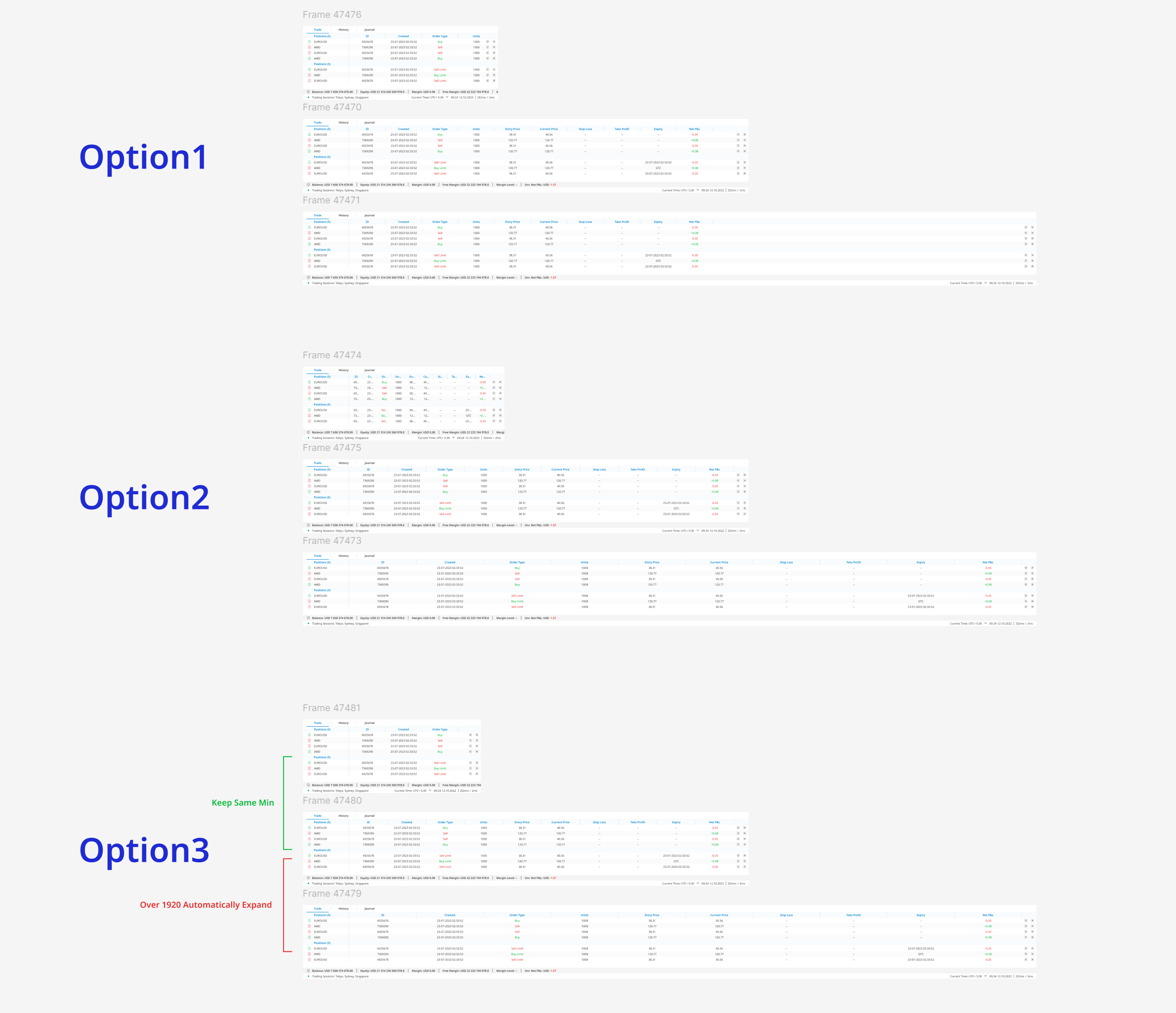
Lead designer for the entire LogixTrader product surface at ACY — the web trading platform plus intellogix, the admin portal that governs every symbol, every account, and every IB white-label tier behind it. Four audiences served by one platform: retail traders, introducing brokers, small hedge funds, and institutional integrators embedding our quote/chart widgets. The thesis: density done right is faster than minimalism done wrong — and the back-office is where senior product design actually lives.

Live demo.acylogixtrader.com
100K+ Platform traders
8.2s → 1.8s Time-to-trade · n=15 paired
96/100 Lighthouse · WCAG 2.1 AA
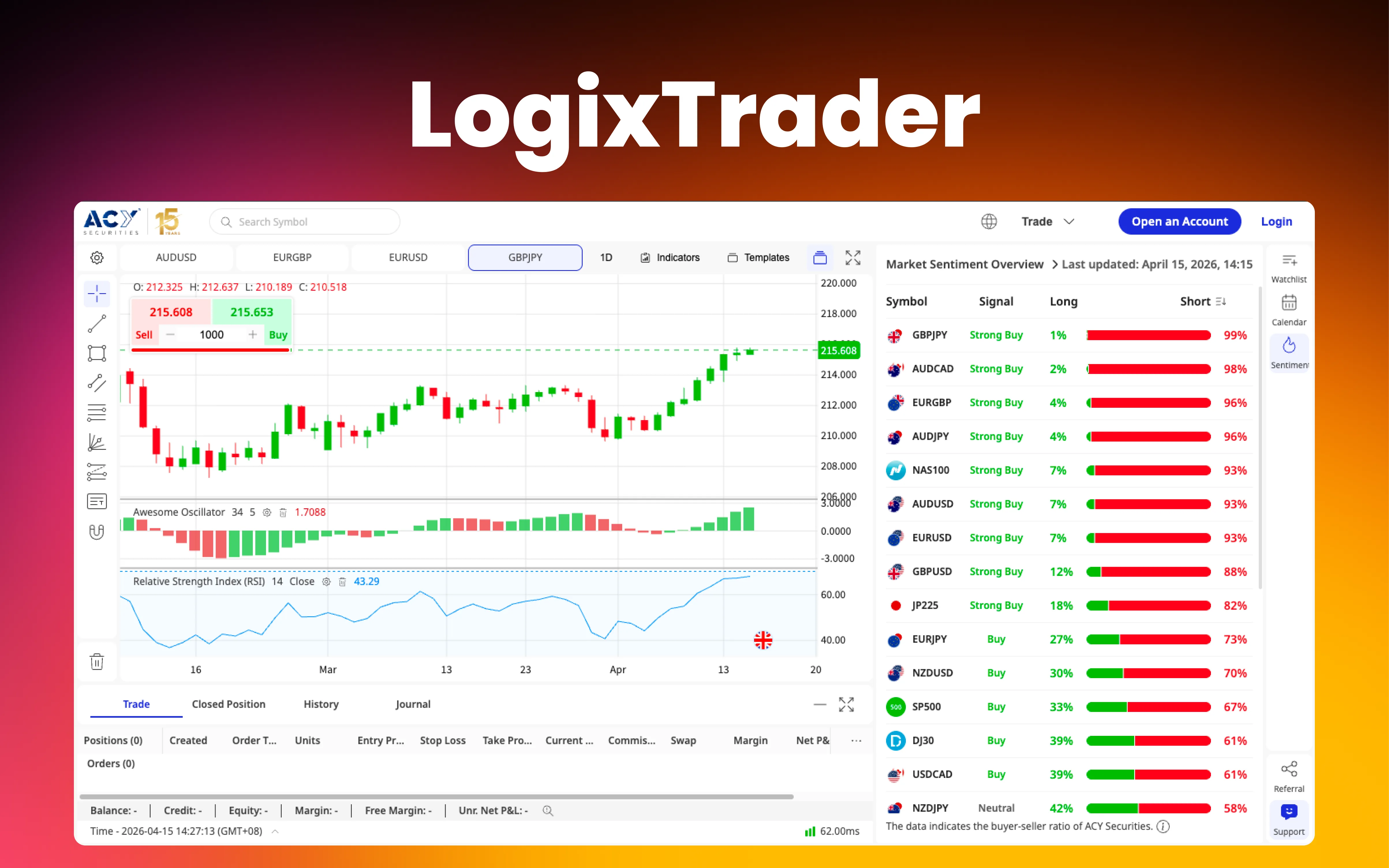
LogixTrader trading platform — terminal view with chart, order panel, watchlist, and position bar

COLLABORATION FRAMEWORK

My role: Lead Product Designer · end-to-end UX/UI · interaction spec · design-system governance.
Team: 4 Frontend + 1 Backend (real-time data feeds) · Product Manager (competitive analysis, feature roadmap) · Legal & Compliance Officer (order validation rules, risk disclosures) · 45 beta traders (usability testing).
Context: Cross-functional team inside the ACY ecosystem. Worked within established brand guidelines while building platform-specific interaction patterns for execution and risk surfaces.

The Problem

Three constraints that determined whether LogixTrader would be adopted or abandoned

MT4/5 isn't just a platform — it's a network effect. Brokers offer it because traders demand it; traders demand it because every broker offers it. Breaking that loop required understanding three forces working against any challenger.

EUR/USD · LIVE 1.0942 ▲ +3 1.0945 ▼ −1 200ms 800ms DECISION WINDOW

Constraint 01

Sub-second decision environment

Active forex traders operate in 200–800ms windows. A cluttered interface doesn't just frustrate — it directly costs them money. Every design decision had to pass: does this help or hinder a split-second call?
200–800MS
F9 · NEW F10 · BUY CTRL+T CTRL+M YEARS OF MUSCLE MEMORY PRESERVED, NOT REINVENTED

Constraint 02

MT4/5 muscle memory lock-in

Professional traders have spent years building unconscious motor patterns around MetaTrader. Any alternative that disrupts those patterns reads as "slower" regardless of actual performance. We mapped MT4's most-used shortcuts and intentionally preserved them.

F9 · F10 · CTRL+T
EUR/USD · 1.0942 · ▲ +0.27% P&L MARGIN EQUITY USED % ~100 data points · scannable in <1s

Constraint 03

Information overload vs. paralysis

A trading interface must simultaneously surface price feeds, open positions, account metrics, order forms, charts. Too little = workflow gaps. Too much = decision paralysis. The challenge isn't reduction — it's hierarchy.

HIERARCHY > REDUCTION

Architecture Decision

The most consequential decision wasn't visual — it was architectural

Three paths forward. Each had a believable case for it. The chosen one — hybrid — got us live in under 8 months without compromising UX or shouldering the operational risk of replacing battle-tested execution infrastructure.

Rejected

Option A · Full rebuild from scratch

Build proprietary matching engine, data feeds, charting library, UI from zero. Complete stack ownership.

Why not: 2–3 year timeline, unproven execution infrastructure. MetaQuotes has spent 20+ years on matching-engine reliability. Replicating that from zero is unacceptable operational risk for a regulated broker handling real client funds.

Rejected

Option B · Skin over MT4/5 web terminal

Apply custom CSS/UI layer on MetaTrader's existing web terminal. Fastest path to market.

Why not: Locked to MetaQuotes' component architecture and update cycle. No room for contextual data surfacing, custom shortcuts, or density-aware layering. No competitive moat — perpetually constrained.

Chosen

Option C · Custom frontend + MT bridge

Fully custom proprietary UX, connected to MT's proven execution backend via API bridge. Design freedom + battle-tested reliability.

Why this: Full design control over the experience — progressive disclosure, custom layouts, keyboard-first workflows, contextual data surfacing — with MetaTrader handling execution. Live in under 8 months. demo.acylogixtrader.com runs on this architecture today.

What Doesn't Work

V1 was wrong, and the wrongness is the case study

I designed for the portfolio I wanted to show, not the users I was serving. Removed keyboard shortcuts. Hid quick-access panels. Collapsed data density for whitespace. The brutal feedback below is what made V2 possible — and what made me a better designer.

Usability test · n=45 active traders · 14-day observation · V1 vs V2

Metric MetaTrader 4
(Baseline)
LogixTrader V1
(Too minimal)
LogixTrader V2
(Hierarchical density)
Task failure (rapid execution) 12% 82% 4%
Avg. time-to-trade 2.1s +3.5s 1.8s
Projected abandonment Baseline 42% <5%
User satisfaction (1–5) 3.8 1.4 4.7

Directional signals on n=45 cohort. Order-placement isolated test on n=15 paired within-subjects (8.2s → 2.9s, Cohen's d = 2.47).

"Looks nice. Can't trade on it." — direct quote from 8 separate testers on V1. The hardest feedback I've received in my career, and the one that taught me the most.

Beta tester · n=45 cohort · ACY usability lab
V1 · Too minimal

Designed for the portfolio, not the users

  • Keyboard shortcuts removed for "clean" click-based UI
  • Quick-access order panels hidden behind hamburger menu
  • Market depth moved to separate tab — extra click per trade
  • Position summary collapsed by default — no glanceable P&L
  • 82% task failure on rapid execution scenarios
V2 · Dense but hierarchical

Density done right is faster than minimalism done wrong

  • Full keyboard shortcut system with discoverable overlay (Shift+?)
  • Persistent one-click order widget pinned to active chart
  • Market depth integrated inline with bid/ask spread visualisation
  • Always-visible position bar — live P&L · margin % · quick-close
  • 4% task failure · faster than MT4's 2.1s baseline

The lesson that carried into every project since: Minimalism ≠ clarity in data-dense professional environments. Professional users don't need less information — they need better hierarchy. The design challenge is organisation, not reduction. Validated downstream on Finlogix, ACY Connect, TradingCup.

Outcomes

What V2 produced

Numbers below split design-attributable from team-attributable. Live demo above is the strongest evidence — the platform you can click on right now is the artefact this case study is about.

<2s Avg. order execution flow — intent to confirmation Source · Usability test n=45
8.2 → 2.9s Order placement time · paired within-subjects Source · n=15 · Cohen's d = 2.47
1-Click Market order from any platform state Design-attributable · interaction model
96/100 Lighthouse · WCAG 2.1 AA conformant axe DevTools · 0 critical violations

Stakeholder impact, four ways

Business

Platform independence

Reduces dependency on third-party licensing. Custom feature development on ACY's own timeline. Differentiator in client acquisition.

UX

Density-aware information layering

Power traders get density when needed; newer traders get clarity by default. Both audiences served without mode switching.

Engineering

Hybrid architecture model

Rapid UI iteration without touching execution infrastructure. Design-system components shared with the broader ACY ecosystem accelerate cross-product consistency.

Trader

Measurable speed advantage

One-click execution + persistent position management + keyboard-first design. Faster than MT4's baseline on the same hardware, validated head-to-head.

Validated Principles

Three positions I'd defend in any senior interview

Each one was tested under fire on this project. Each one carries a counterargument I had to talk past in a real meeting.

Principle 01

Density is not the enemy — bad hierarchy is

The instinct to "simplify" trading interfaces by removing data is wrong. Professionals need dense information; the design challenge is making 100 data points scannable in under a second through size, weight, colour, grouping.

Principle 02

Muscle memory is the biggest competitor

Designing against an incumbent with 20+ years of habit formation, "objectively better" isn't enough. The platform had to feel familiar enough to lower switching cost while different enough to justify the switch — that meant preserving the most-used MT4 shortcuts deliberately.

Principle 03

Hybrid architecture unlocks design freedom

A custom frontend on proven execution infrastructure was the single most important enabler of good UX. Without it, we'd have been constrained to the incumbent's layout paradigm — no progressive disclosure, no density-aware layering, no shipped product in 8 months.

Project Details

What stakeholders said

"Ed's design system reduced our frontend implementation time significantly. More importantly, he anticipated edge cases our engineers would have missed — like the spread-zone validation rules that prevent order rejections."

Lead Frontend Engineer, ACY Securities

"When we needed to pivot from V1 to V2 after user testing, Ed didn't get defensive about the feedback. He reframed the 82% failure rate as a learning opportunity and delivered V2 with 4% failure rate. That's the kind of designer who makes teams better."

Product Manager, ACY Securities

Testimonials reflect authentic feedback. Available for verification during interview process.

Accessibility standards

WCAG 2.1 Level AA conformant
· Lighthouse score: 96/100
· 0 critical contrast violations (axe DevTools)
· Keyboard navigation: 100% feature parity
· Screen reader tested: NVDA + VoiceOver

View accessibility deep-dive →

Key expertise

#FinTech UX #Trading Platform #Cognitive Load #Information Architecture #Keyboard-First #Design System

Related projects

Design Artifacts · Figma

Where data logic, UX, and visual design are one system

In a trading platform, a validation rule is a UX decision; an interaction state is a visual system. Each artefact below is one place those three layers collapse into one.

Artefact 01

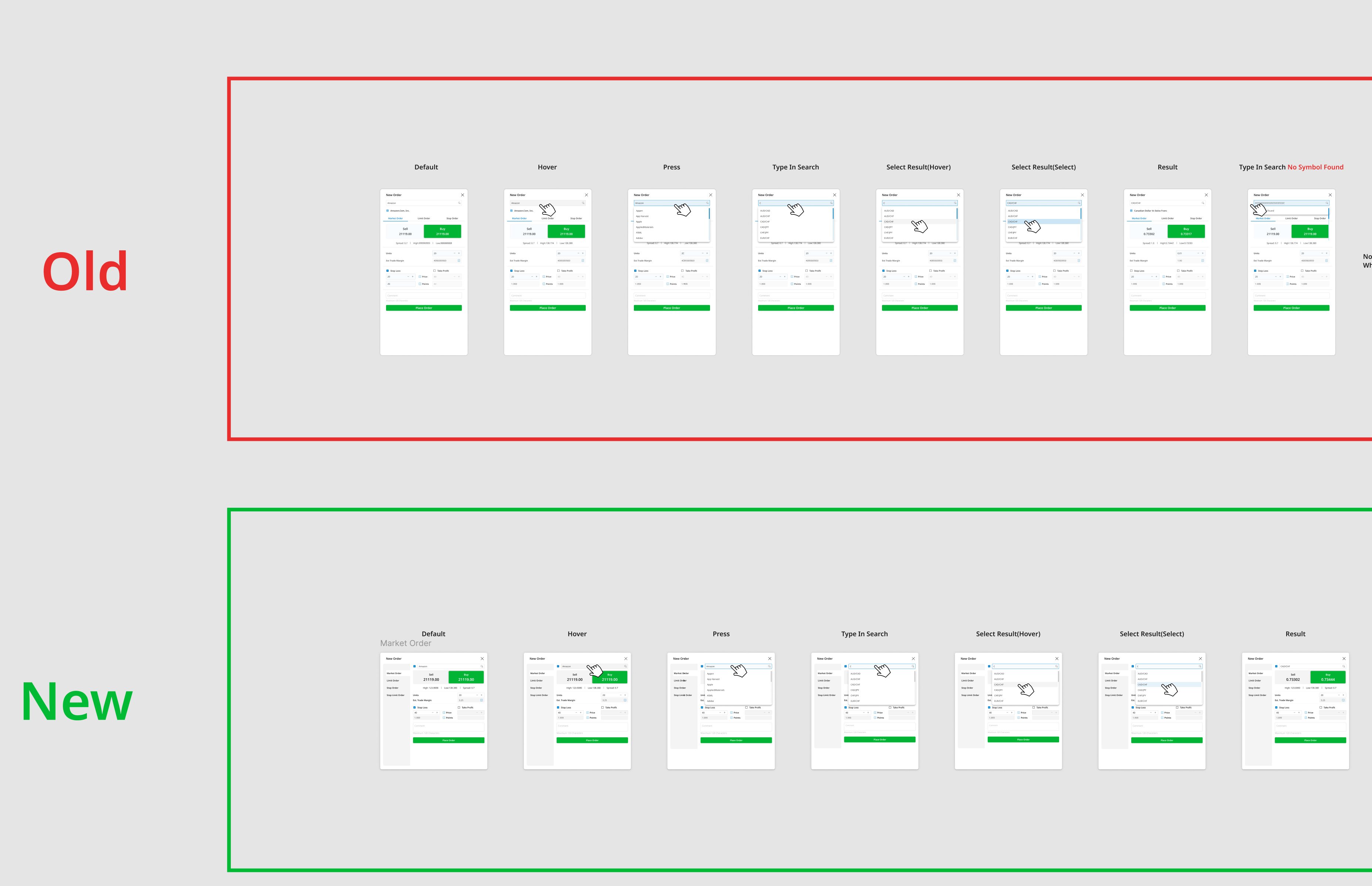
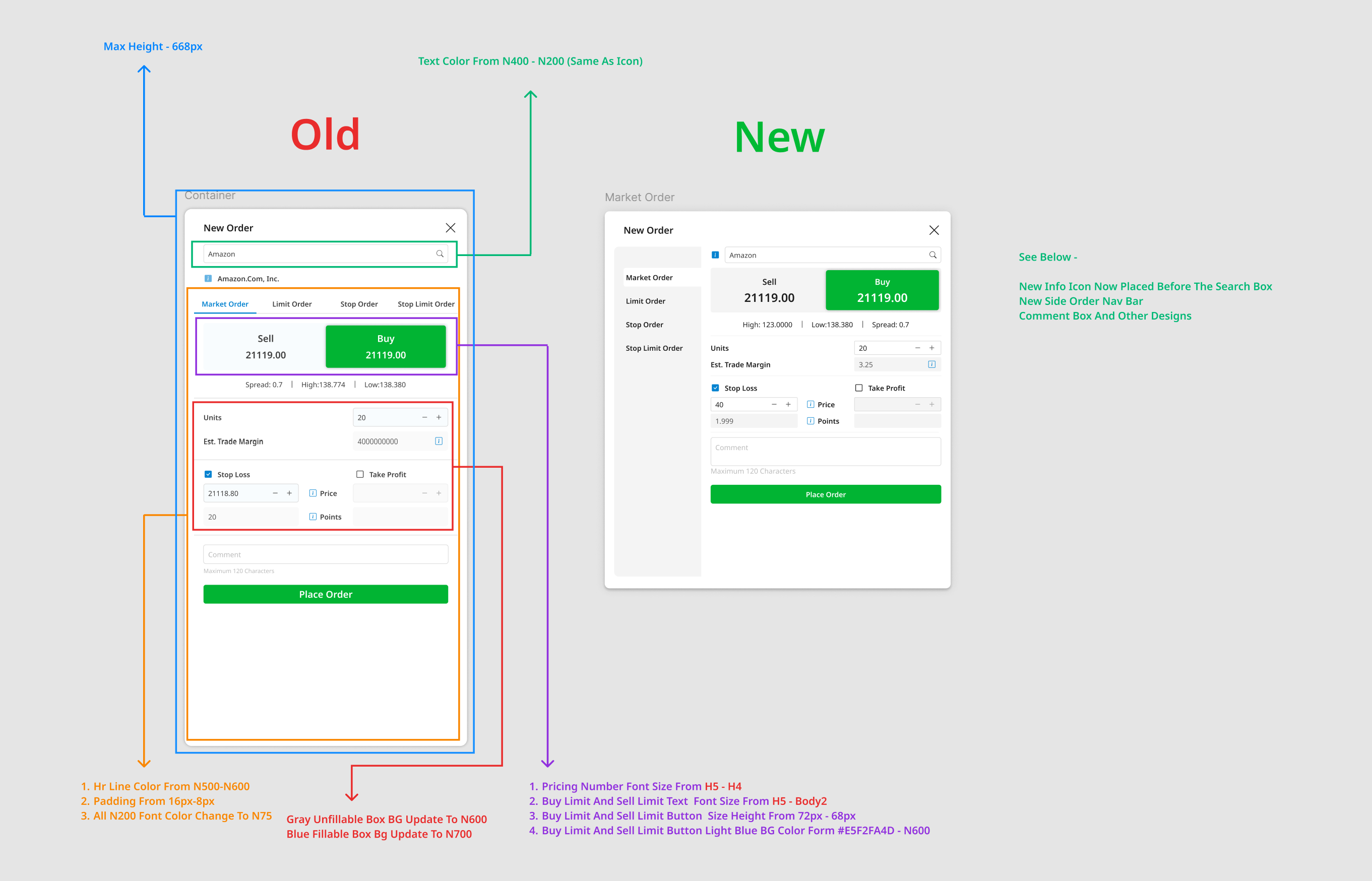
Order panel · systematic state redesign

Highest-frequency surface — traders interact 30–80× per day. Every state (default, hover, press, search, result) mapped and rebuilt for friction reduction without losing density. Old → new comparison shows typography scale, colour tokens, and spatial hierarchy refined deliberately.

Interaction state mapping · old vs. new comparison across default / hover / press / search / select states
Order panel interaction states comparison: old vs new across default, hover, press, type-in-search, select-result
Design specification · typography, colour tokens, spacing audit, Buy/Sell button height standardisation
Order panel detailed redesign specifications with typography colour and Buy/Sell button height

Artefact 02

Error prevention design · validation logic as UX

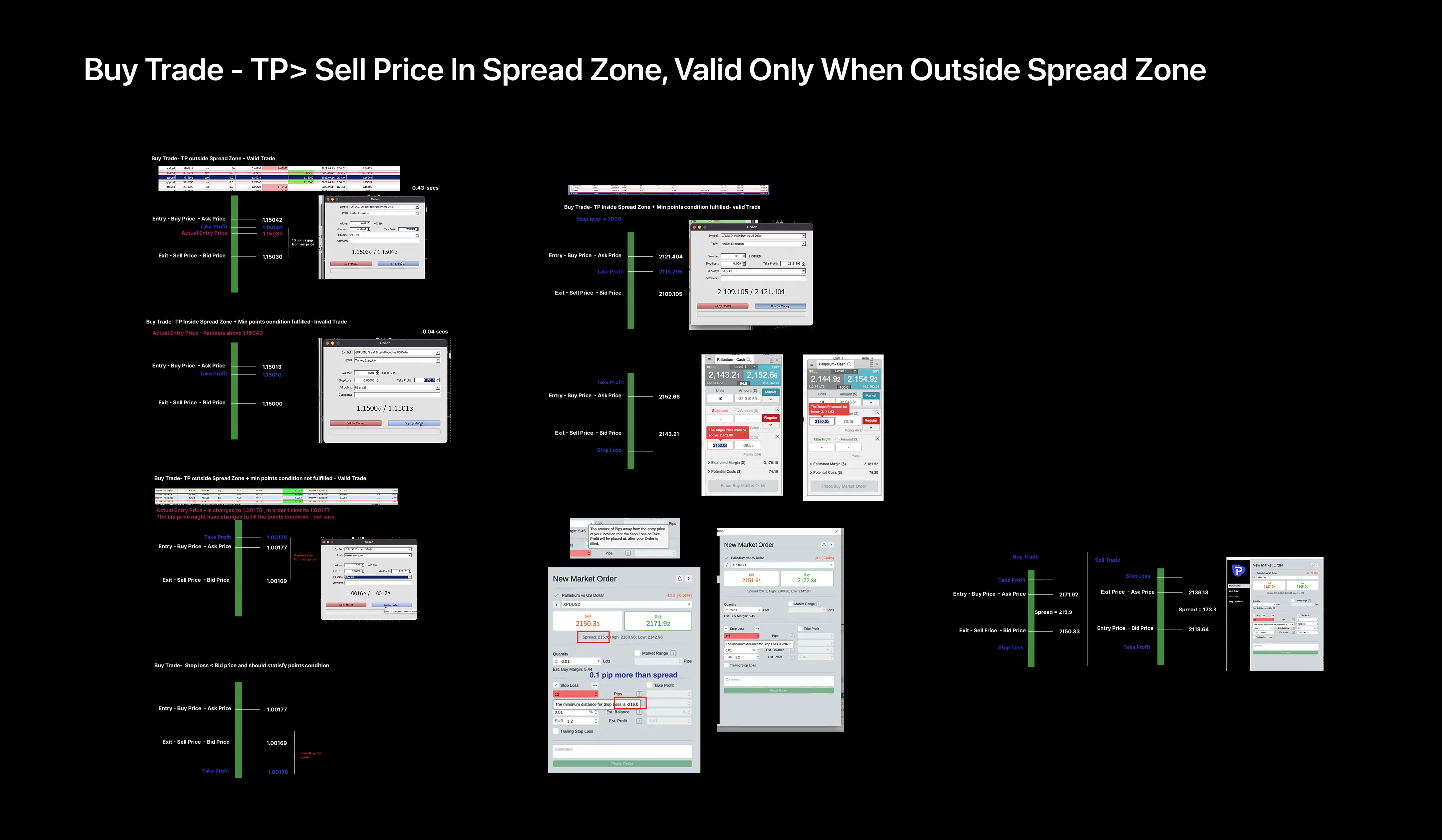
A Take Profit inside the spread zone = rejected order. An invalid Stop Loss = unprotected exposure. Prevent errors at input, not at submission. Real-time visual feedback shows traders exactly where constraints exist before they commit.

Buy trade · TP/SL spread zone validation · visual indicators show where TP/SL sits relative to valid execution range
Buy trade spread zone validation: TP must be outside spread zone with visual indicators
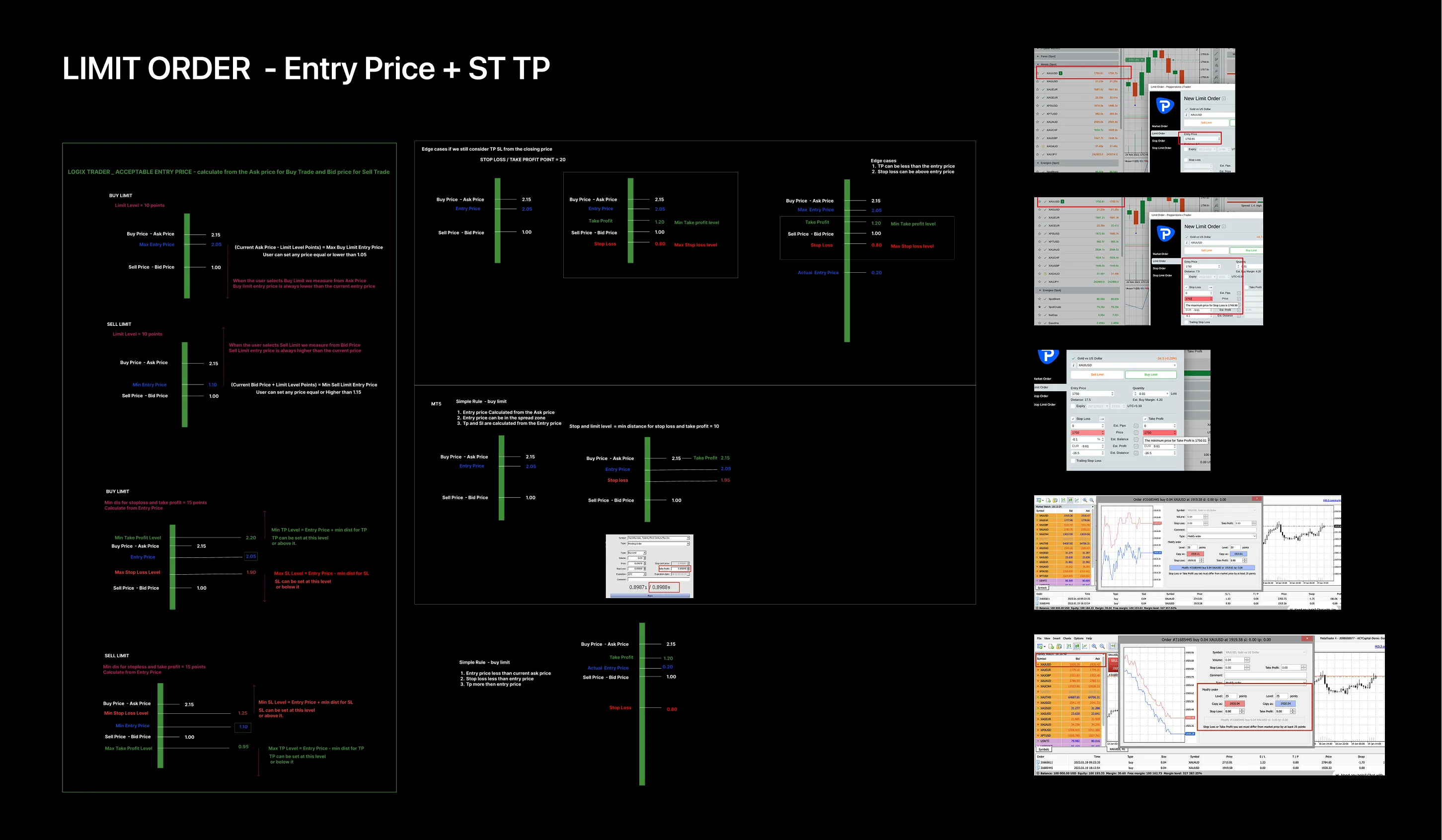
Limit order · Entry/SL/TP interdependency map · cross-referenced with MT4/5 validation behaviour so traders' mental models transfer correctly
Limit order validation: Entry price determines valid SL/TP ranges for Buy vs Sell

Artefact 03

Global interaction system · table consistency

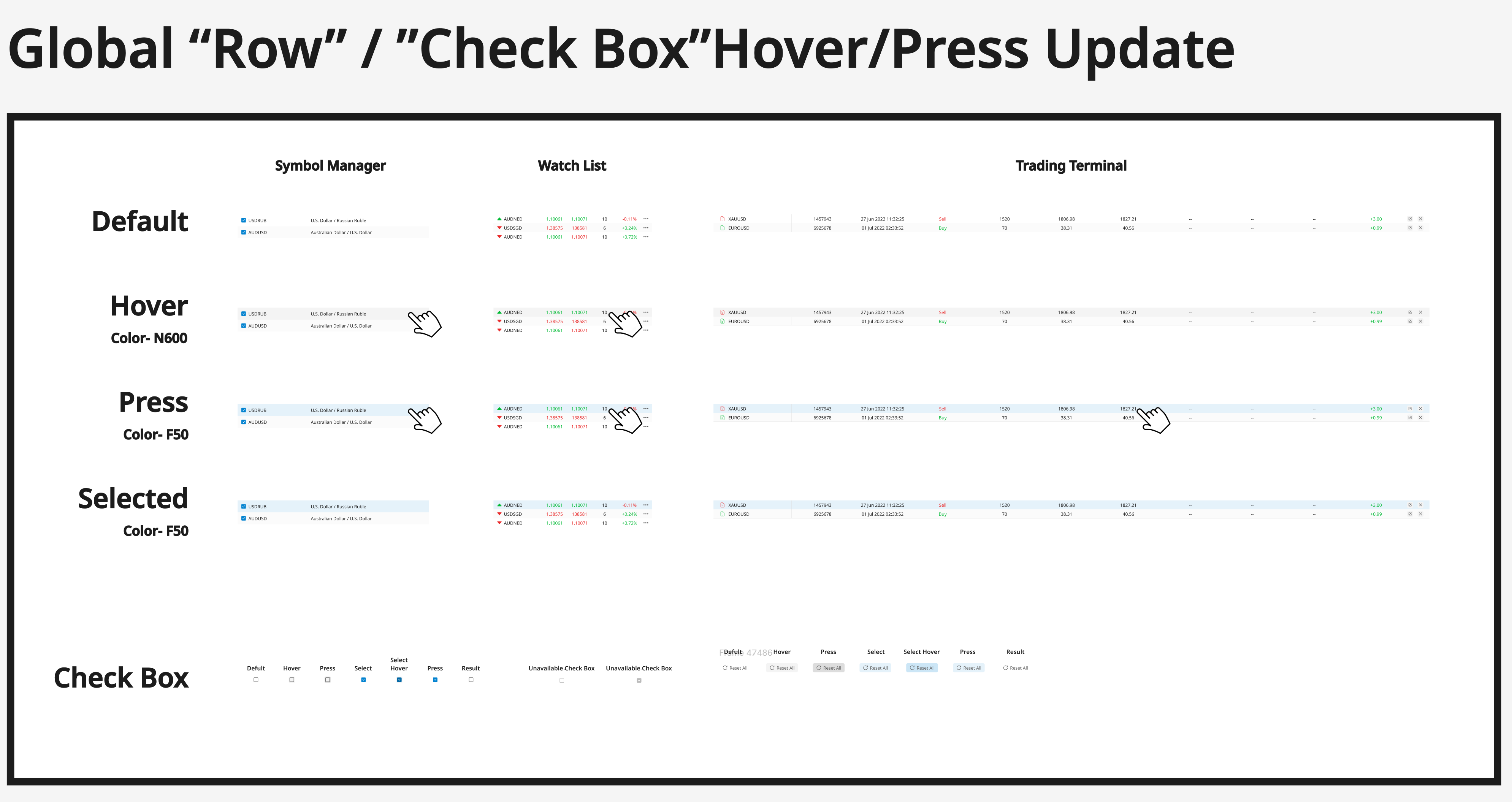
Symbol Manager, Watch List, Trading Terminal — three data-dense tables, one interaction grammar. Hover, press, select, checkbox: same behaviour, same affordances, same feedback. A trader's muscle memory works identically across every table on the platform.

Global row + checkbox state matrix · default / hover / press / selected mapped across every table component
Global row and checkbox state definitions across table components
Table interactions · column management, sorting, dragging, row actions, empty states
Trading terminal table interactions: columns, sorting, dragging, row actions, empty states

Artefact 04

User flow · responsive architecture · onboarding

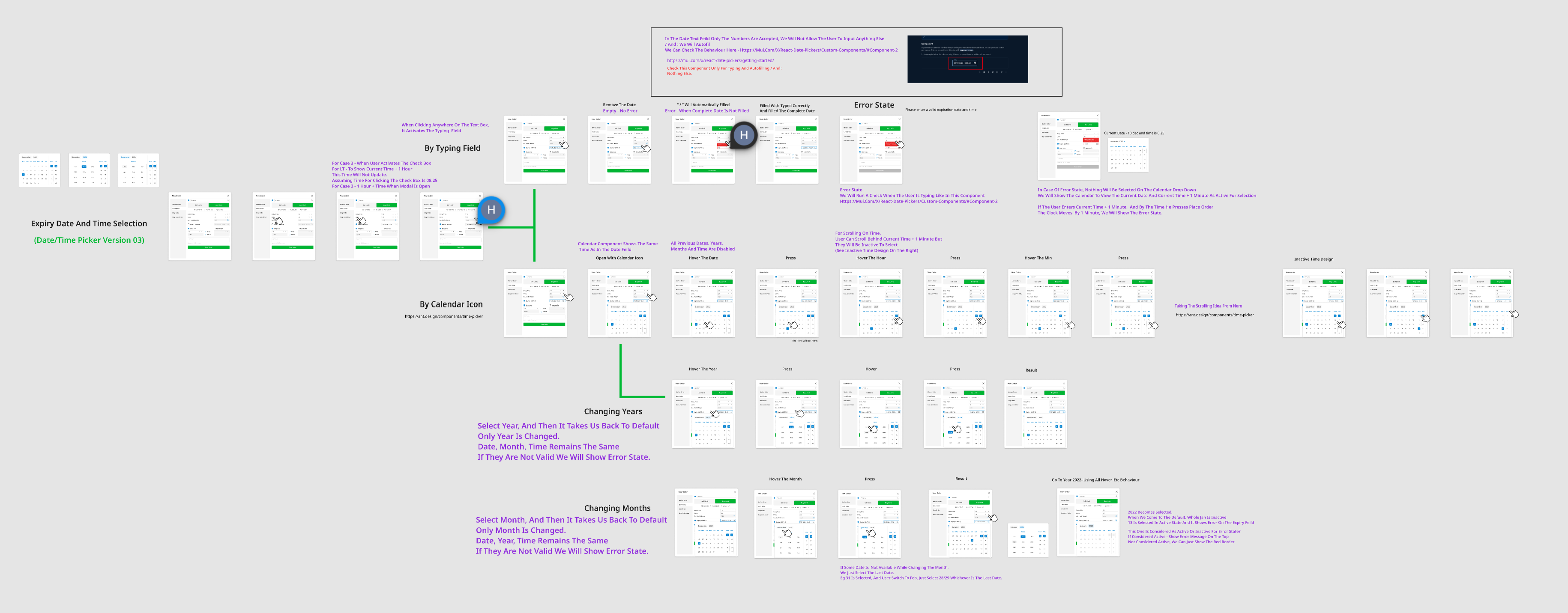
Date/Time pickers required exhaustive state mapping — typing vs. calendar input, every validation error, year/month rollover. Three responsive layout strategies were evaluated against real trader workflows at different viewport widths. New users get progressive complexity; power users skip onboarding.

Date/Time picker · complete state flow · two input methods, year/month nav, error recovery, validation — all in one Figma flow so engineering implements every path
Date/Time picker full user flow with calendar, typing field, year/month navigation
Responsive layout · 3 strategies evaluated · density tradeoffs at different viewport widths
Three responsive layout strategies evaluated for trading terminal
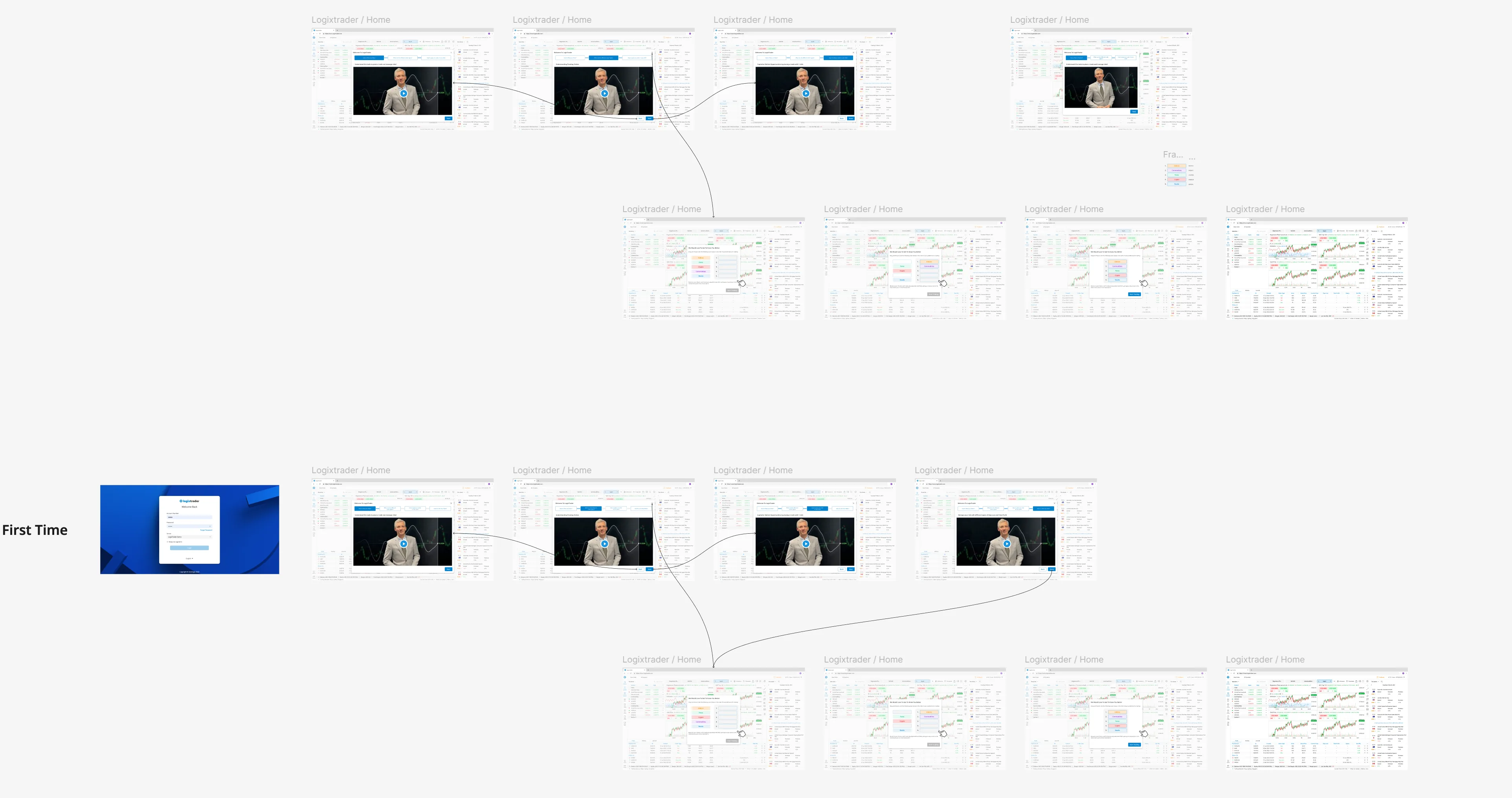
First-time user flow · guided onboarding that progressively reveals platform complexity
First-time user onboarding flow from welcome screen through chart familiarization

Why these four artefacts matter: data constraints (spread zones, validation rules), user experience (interaction states, onboarding flows), and visual design (typography scales, colour tokens, spatial hierarchy) are one unified system. In trading-platform design you cannot separate these three — change a validation rule and the UX changes; change the UX and the visual feedback changes. This is what "design" means in this context.

Beyond the Trading Surface

What I designed wasn't a chart — it was a four-audience platform

The trader-facing platform you've seen so far is one of three surfaces I designed. Behind it sits intellogix — the admin portal where every symbol's tradability, every account's risk posture, and every IB's white-label customisation is configured. Case studies that show only the chart miss what senior PD work actually is.

Admin Portal · 01

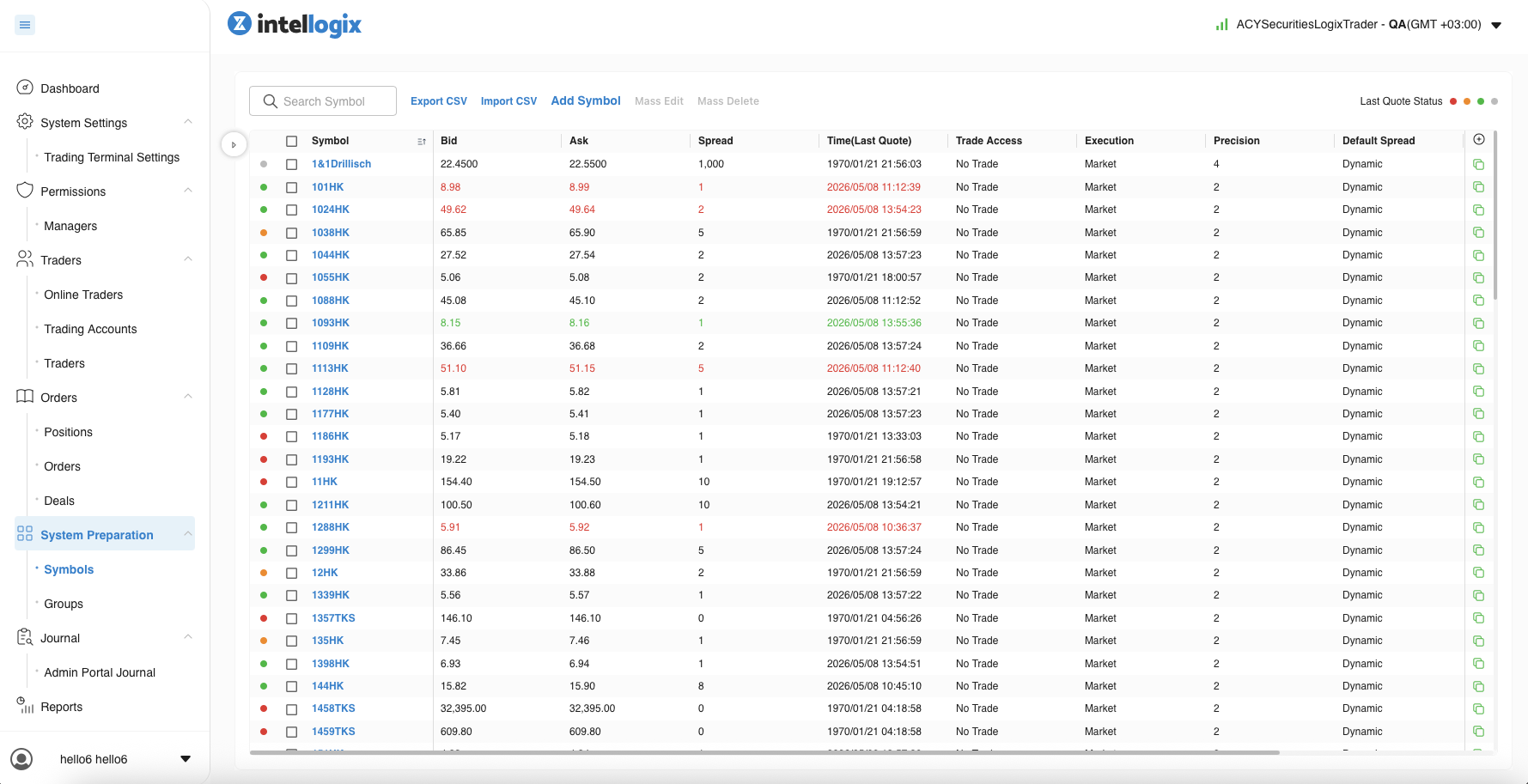
Symbols admin · the table that governs everything traders see

~1,000+ tradable symbols across stocks, forex, CFDs, indices, crypto. Real-time bid/ask quote feed status dots, mass-edit/mass-delete operations, CSV import/export for bulk onboarding, sortable by any column. Every row here is a per-symbol governance config — change the spread, change the trade-access posture, change the precision and the trading frontend reflects it within one tick cycle.

Symbols admin list · per-row Bid / Ask / Spread / Time(Last Quote) / Trade Access / Execution / Precision / Default Spread + Add Symbol / Mass Edit / Mass Delete bulk ops · status dots indicate live quote freshness
Intellogix Symbols admin table — list of tradable symbols with bid/ask/spread/quote-time/trade-access/execution/precision columns and bulk edit operations

Admin Portal · 02

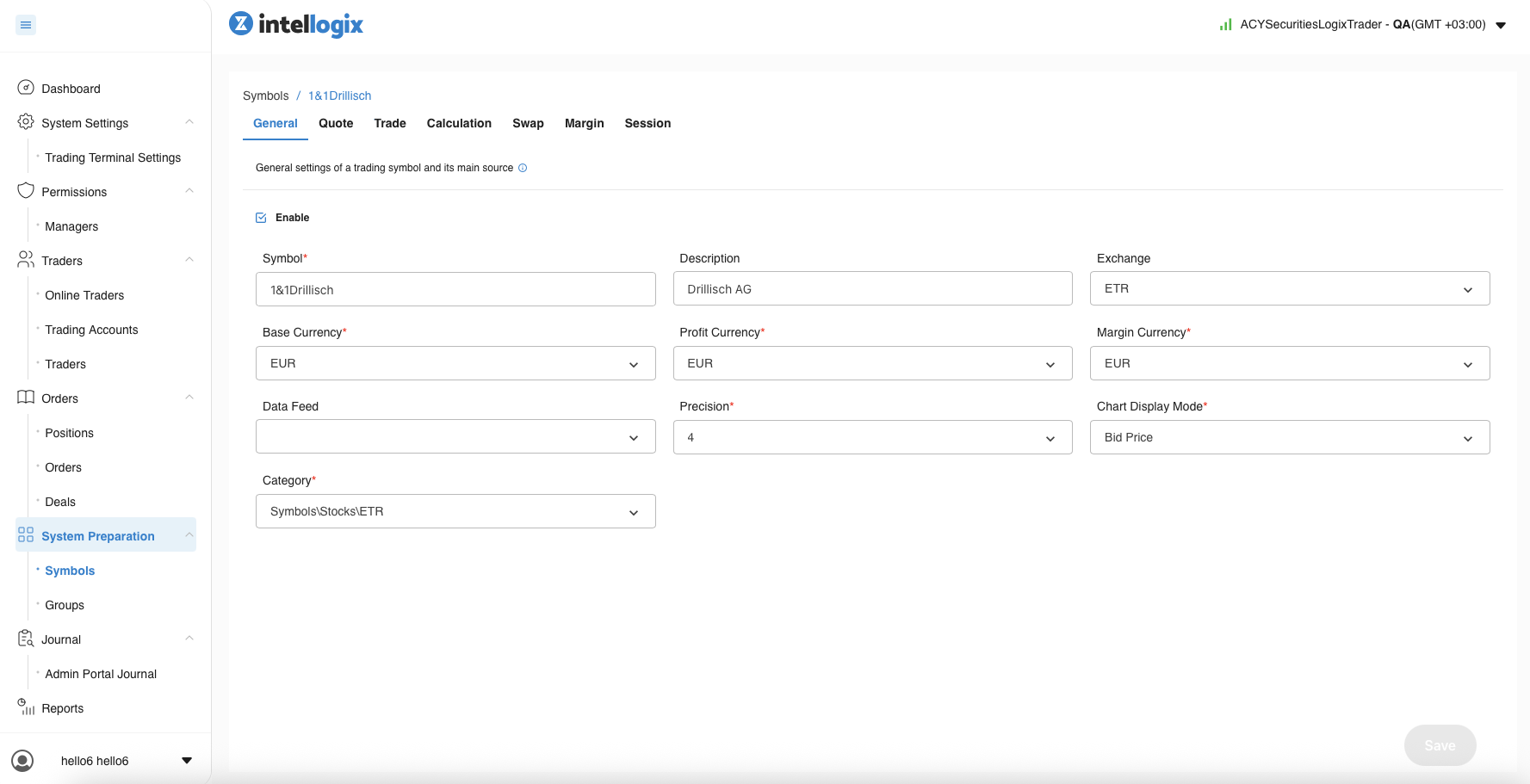
Per-symbol configuration · seven tabs, one source of truth

Click any symbol from the list and you land in a 7-tab detail surface — General, Quote, Trade, Calculation, Swap, Margin, Session. Each tab is a different governance lens on the same instrument. Three of the most consequential tabs shown below.

General tab · symbol metadata + currency triplet (Base / Profit / Margin) + Exchange routing + Data Feed source + Precision + Chart Display Mode + Category taxonomy. The currency triplet alone is non-trivial — it determines how P&L is calculated, how margin is held, and how reports aggregate per account.
Intellogix Symbol General tab — symbol description, exchange, base currency, profit currency, margin currency, data feed, precision, chart display mode, category
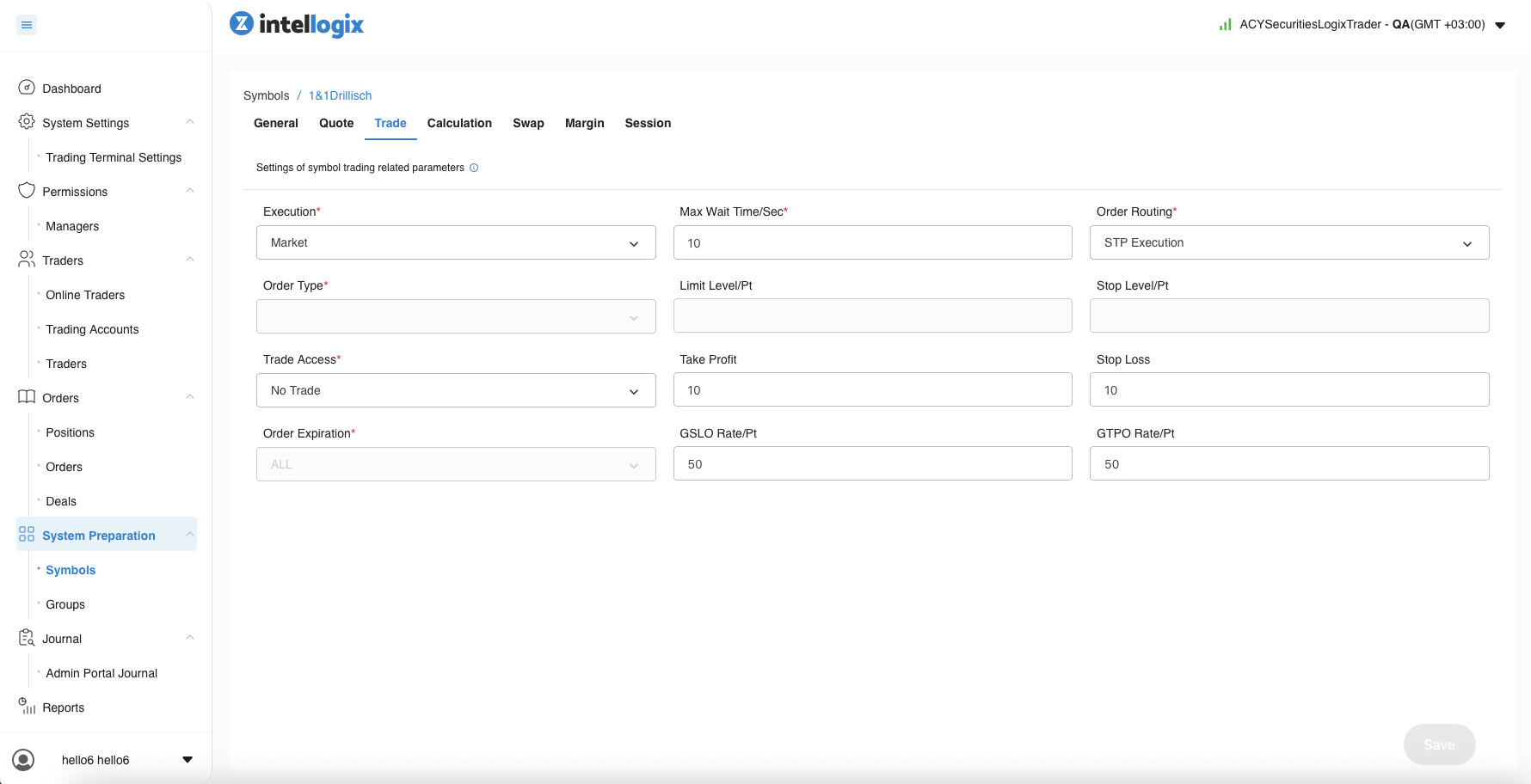
Trade tab · Execution model (Market / Instant / Request) · Order Routing (STP Execution vs A/B-book) · Order Type · Trade Access posture (No Trade / Long Only / Close Only / Full) · Order Expiration · Take Profit / Stop Loss minimums · Limit Level · Stop Level · Max Wait Time · GSLO Rate · GTPO Rate. Twelve fields that decide whether a trade can even be placed.
Intellogix Symbol Trade tab — execution model, order routing, trade access, take profit, stop loss, GSLO and GTPO rate configuration
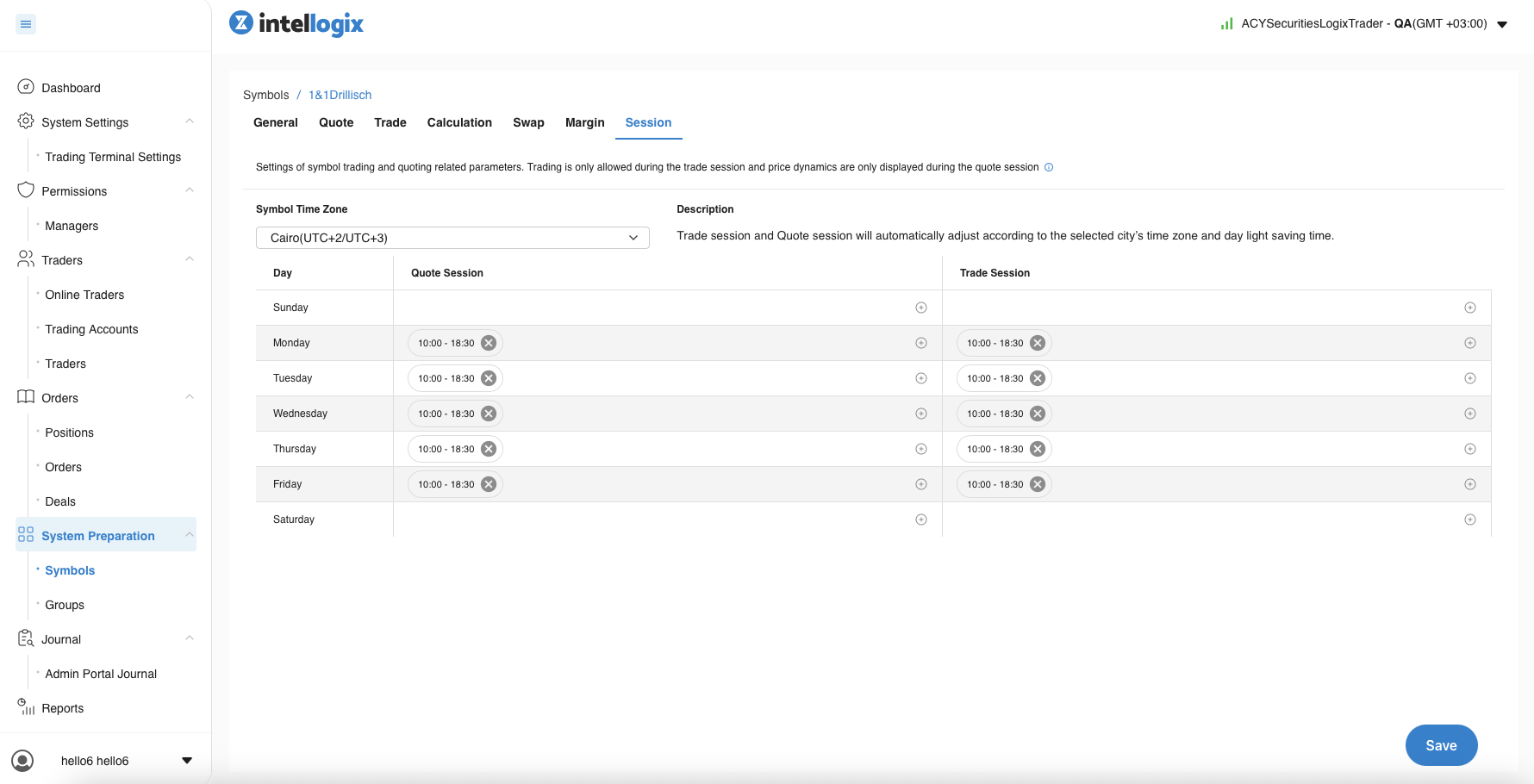
Session tab · timezone-aware Quote Session vs Trade Session windows, configurable per weekday. This is what makes cross-jurisdiction listings work — a HK stock can quote during HKEX hours while routing through a Cairo (UTC+2/+3) operations team.
Intellogix Symbol Session tab — Symbol Time Zone Cairo UTC+2/+3 with weekly Quote Session and Trade Session schedule Mon-Fri 10:00-18:30

Admin Portal · 03

Operational dashboard · production scale

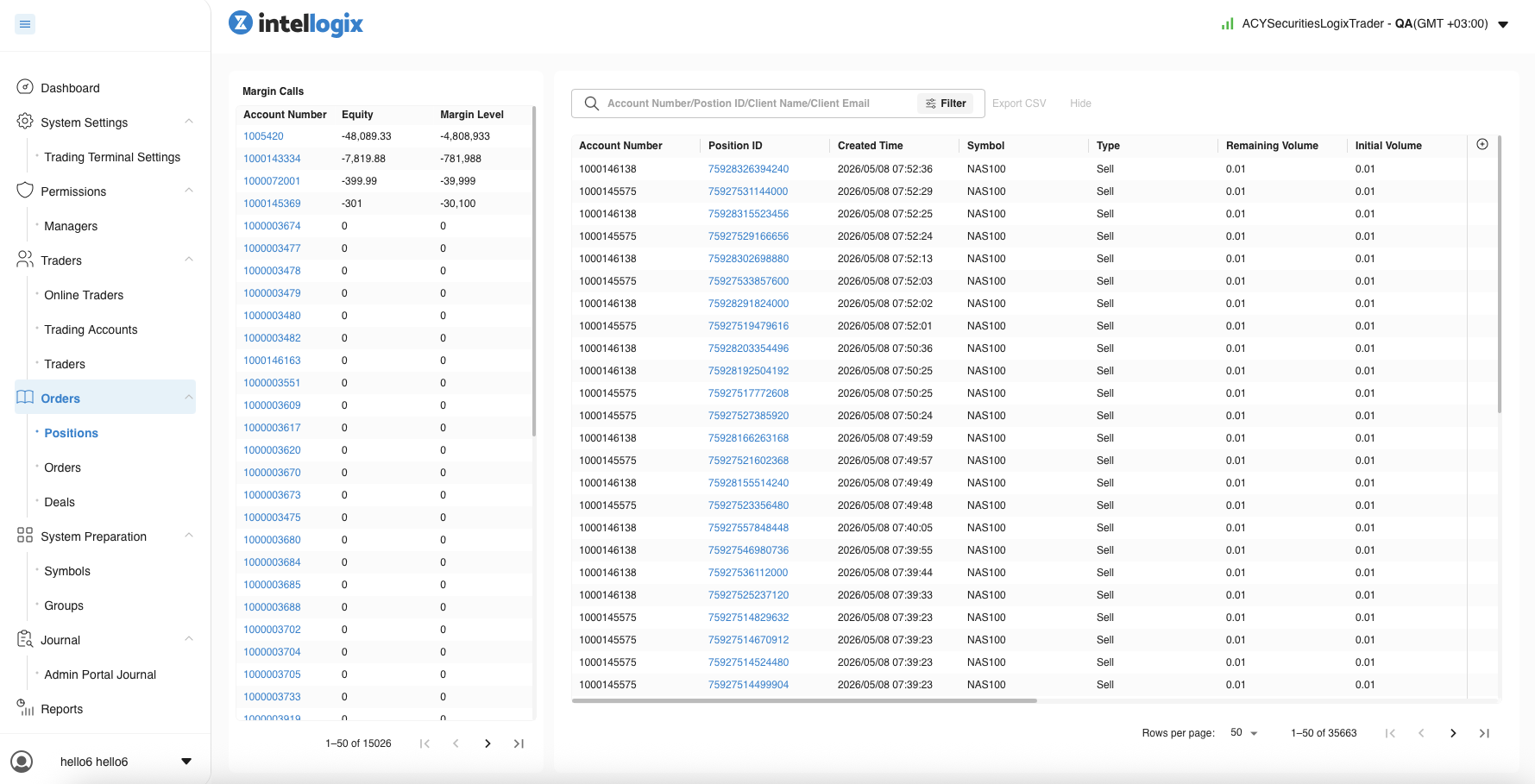
15,026 trader accounts · 35,663 open positions · live margin-call queue with equity tracking and margin-level alerting. The left panel surfaces accounts trending toward stop-out so risk officers can intervene before auto-liquidation; the right is a paginated, filter-by-account-or-position-ID stream of the entire open book.

Positions + Margin Calls · 15K accounts · 35K positions · real-time margin-level alerting. Pagination + filter chip + per-account drill-in. This is the surface a risk officer keeps open all day — the design has to honour glanceable scan + one-click drill in equal measure.
Intellogix Positions and Margin Calls dashboard — left panel shows accounts trending toward margin call with equity and margin level columns, right panel shows 35663 open positions with account and position ID filtering

Why the admin portal matters for senior-PD evaluation: the trading frontend is where the muscle memory lives, but every per-symbol decision a trader sees was made in this table by an ops admin or a compliance officer. Designing both surfaces consistently — same interaction grammar, same component library, same escalation paths — is the work that separates a chart designer from a platform designer.

Multi-Audience Design

Five audiences, one platform — five different reading orders for the same data

Same backend, same symbol catalogue, same execution infrastructure. But what each audience needs to see first is fundamentally different. The platform serves all five without mode-switching, because each surface was designed knowing the others existed.

EUR/USD · 1.0942 ORDER BUY SELL WATCHLIST EUR/USD · GBP/USD · USD/JPY · NAS100

Audience 01

Retail trader

Chart + order panel + watchlist + position bar. Reads price first, decides next, executes within 200–800ms. Doesn't need to know the symbol's currency triplet — just that the order will route. Surface: LogixTrader web platform.

100K+ TRADERS
[LOGO] YourBroker.com · trade.yourbroker.com SYMBOL SUBSET 42 / 1000+ symbols forex + indices only COMMISSION ACCRUAL $24,820 Q4 · 1,247 traders

Audience 02

Introducing Broker (small IB)

White-labels the platform under their own brand. Configures a curated symbol subset (forex-only, or indices-only, etc.). Tracks commission accrual across their referred trader base. Surface: branded LogixTrader + IB admin slice of intellogix.

CONFIGURABLE BRAND SUBSET CONTROL
FUND A · 8 SUB-ACCOUNTS $48.2M AUM SUB-01 +$12.4K SUB-02 −$3.8K SUB-03 +$8.7K +5 MORE FIX 4.4 · NEW ORDER SINGLE · 35=D programmatic order entry · custom strategies

Audience 03

Small hedge fund

Manages 5–20 sub-accounts under one master entity. Needs aggregated P&L, position roll-up, risk overlays per strategy. Routes orders programmatically through FIX 4.4 — UI is for monitoring, not entry. Surface: LogixTrader portfolio view + FIX API endpoint.

FIX 4.4 API MULTI-ACCOUNT
JURISDICTION · ASIC + ESMA + FCA MIFID II · BEST EXECUTION REPORT RTS 27 · QUARTERLY EXEC QUALITY venue fill rate · slippage · latency · cost

Audience 04

Institutional platform

Multi-jurisdiction routing (ASIC + ESMA + FCA + ASA) · custom session windows per market · MiFID II Art 27 best-execution reporting (RTS 27 quarterly venue quality, RTS 28 top-5 venues). Surface: full intellogix admin + reporting layer + custom audit trail.

MIFID II RTS 27/28 40+ JURISDICTIONS
PARTNER SITE · iframe.html CHART WIDGET QUOTE WIDGET EUR/USD · 1.0942 ▲ ORDER WIDGET · SANDBOXED OAuth · partner key + scope embed.acylogixtrader.com/widget?type=chart&sym=EURUSD

Audience 05

3rd-party widget integrator

Embeds chart, quote, or order widgets into their own affiliate site / news portal / strategy blog. Requires sandboxed auth (OAuth + partner key + scope), branding controls, and graceful degradation when API rate-limits. Surface: standalone embed.acylogixtrader.com widget endpoints.

EMBEDDABLE OAUTH-SANDBOXED

What designing for five audiences taught me — and made demo-trading-terminal possible: every audience reads the same data in a different order. The retail trader's screen has the same symbol catalogue as the institutional platform's reporting layer, but the IB sees only their curated subset, the hedge fund sees aggregated positions across sub-accounts, and the widget integrator sees a single instrument in a sandboxed iframe. Designing the platform meant designing all five reading orders simultaneously — symbol logic, trade logic, back-office governance, multi-tenant isolation, and embeddable surface. The discipline carried directly into demo-trading-terminal — that demo is the consumer-facing distillation of every domain insight LogixTrader produced.

Live Demo · Execution Quality Analytics

Best execution isn't a promise — it's a measurement

MiFID II requires systematic best execution reporting. LogixTrader's analytics layer surfaces fill quality across venues, slippage against VWAP benchmark, and latency distribution — so a trader can see not just where their order was routed, but whether that routing decision was optimal given market conditions at submission time.

Refreshes every 3s · Simulates real-time execution feed · All data synthetic

Venue Fill Rate · Last 250 Orders % filled at or better than limit
Slippage vs VWAP Benchmark bps · positive = improvement
Order-to-Fill Latency (ms)
Execution Stream

Portfolio thread

Where this connects

LogixTrader sits inside two threads that run across the portfolio.

Thread

Retail → Institutional Translation

What breaks when consumer UX patterns meet regulated institutional contexts — and what replaces them

  • LogixTrader — Proprietary Trading Platform Consumer MT4 alternative optimized for discretionary trading UX Shipped · Live Demo · discretionary vs algorithmic boundary
  • FIX 4.4 Latency & Order Entry Consumer form patterns fail at institutional latency — four replacements Field note · 8–12ms budget · pre-flight validation
  • ACY Securities — Design System The five-platform ecosystem LogixTrader is part of Case study · 150 components · 8 regulatory rewrites

Thread

Evidence & Verification Discipline

How quantitative claims are sourced, validated, and turned into design decisions

  • LogixTrader — V1 Failure & Recovery Minimalism reduced task completion time but dropped task confidence 31% Shipped · n=15 usability sessions · paired within-subjects
  • Lessons Learned — Failure 03 Institutional density for retail — the LogixTrader pattern failure documented Methodology · 3× error rate · progressive complexity recovery