ConnectX
Private Banking CRM
A CRM for the room where decisions are made between people, not from an enterprise CRM dashboard. Eleven screens, eight named AI agents, four explicit autonomy levels — observatory rather than control room. Cormorant Garamond, gold leaf, and an oxidized lavender reserved for moments when an agent is speaking. True concept: research-grounded original IP, not a client project; the React bundle is a working artefact.
Product designer — ConnectX (AI-augmented private-banking CRM concept)
A relationship-manager CRM where AI proposes and the human disposes — autonomy modelled as four tiers, with a sign-off at every consequential action.
Modelled-vs-measured: 8 agents, 4 tiers, and 11 screens are working-artefact scope, not production outcomes. No adoption, no A/B, no live LLM. Synthetic $24B book is scenario data, not measured AUM. True concept — research-grounded original IP, not a client project.
Prefer YouTube? Watch it there ↗
A concept artifact, not a shipped product.
ConnectX is a true concept — research-grounded original IP, not a client project. The working artefact is a React bundle exploring how AI-agent UX could feel inside a private bank's relationship-management workflow. The data is synthetic (Fortune 500-style enterprise relationships used as institutional client analogues). "Elena Vance · Compliance · Risk Officer" is a fictional persona, not a real user. Nothing here connects to a production CRM, KYC system, or core banking ledger.
ConnectX shares no engineering or commercial relationship with ACY Connect — that is ACY Securities' B2B trading platform documented separately. The naming overlap is incidental; this case study sits in the same lineage as Xanthos Private Bank (production-grounded), Double-Blind Fiduciary Protocol, and Intent Canvas — true-concept work for the regulated wealth surface.
A private-banking CRM reframed as an observatory rather than a sales pipeline. 8 named AI agents, 4 explicit autonomy tiers (Ambient → Co-pilot → Assertive → Autonomous) framed as a governance switch not a smartness slider. AI observes, never directs. Editorial register, not enterprise-CRM register.
- Working React bundle exploring AI-agent UX inside a private-bank RM workflow
- 8 named AI agents with specific roles (covenant watch, FX-event surfacing, beneficial-owner linkage, etc.) — each agent’s scope is explicit
- 4 explicit autonomy tiers as governance primitives, not a smartness ladder — the tier determines what the agent is allowed to do, not how clever it is
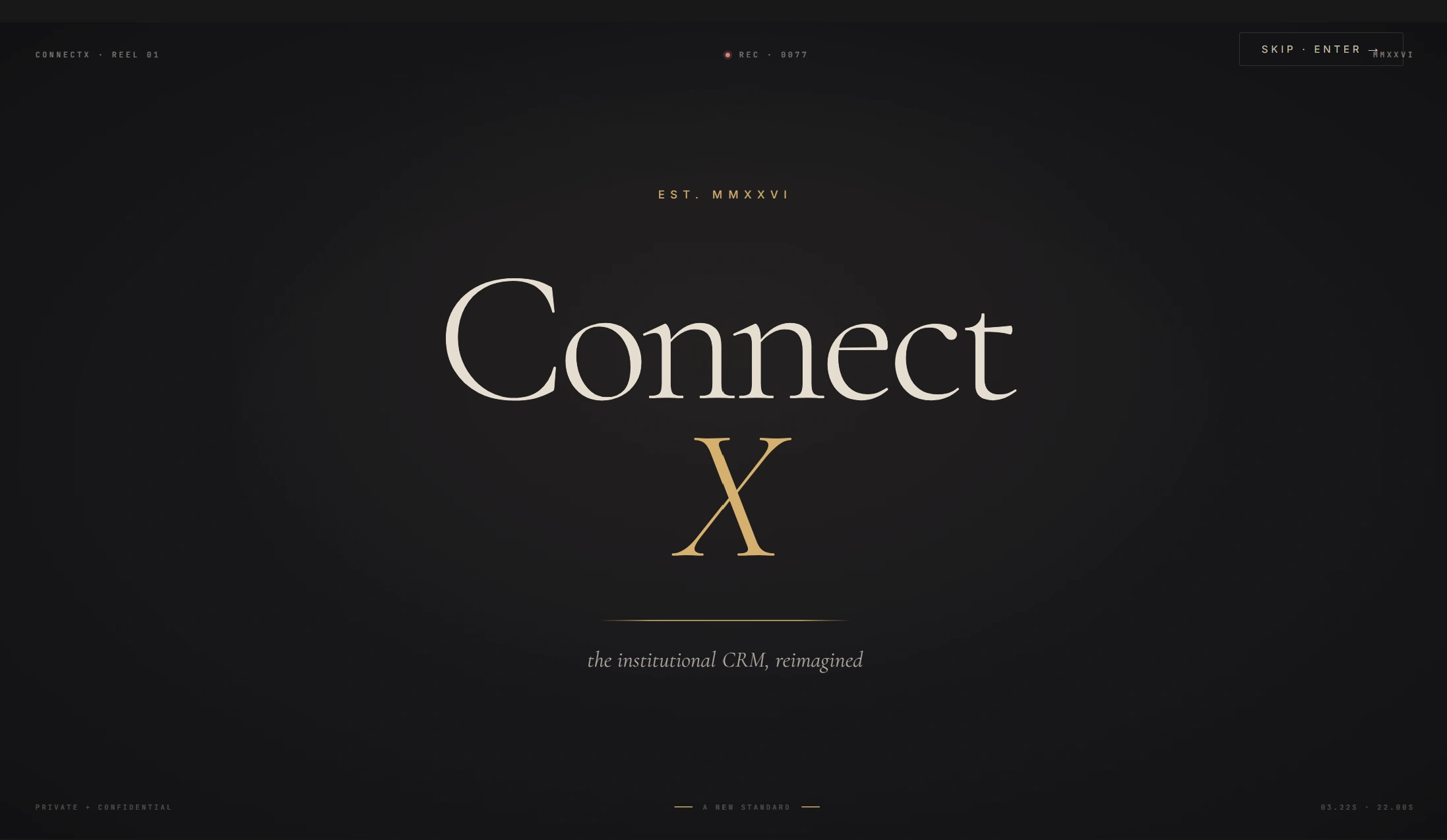
- Editorial visual register (serif Connect with italic gold X over warm-ivory) — the deliberate counterargument to enterprise-CRM density aesthetic
Self-initiated concept, 2026, original IP, zero client overlap — data is synthetic and “Elena Vance” is a fictional persona, with no connection to real CRM, KYC, or core banking systems (and no connection to ACY Connect despite the name overlap). Built as a working React bundle, not Figma mockups — the autonomy-tier transitions are exercised in the live prototype.
Read the full case study · ~22 min The Problem · The Paradigm · Live Prototype · Four Autonomy Tiers · Eight Agents · Eleven Screens
Private banking is the worst-served customer of the CRM industry.
Enterprise CRM suites and institutional data-vendor CRM modules — they all index for transactional sales: lead → opportunity → close. Private banking doesn't work that way. A single Tier I client relationship spans ten years, four entities, twenty-two covenants, three regulators, and a spouse's family office that nobody initially flagged. The CRM the relationship manager actually needs is not a sales pipeline. It is an observatory:
What is moving across my book today, and what does it mean. Quiet relationships that should not be quiet. Agents watching covenants in the background. A 4.2% crude move that reshuffles three accounts before breakfast. AI that observes — never directs. ConnectX is a sketch of what that surface could be, designed at editorial register rather than enterprise CRM register.
CRM-as-database vs CRM-as-observatory.
The default enterprise CRM treats relationships as rows. Each interaction is a record. The UI is a search-and-filter interface over the database. ConnectX inverts: the relationship graph IS the page; the database is implicit. AI agents are persistent watchers, not chat features. Editorial voice replaces dashboard voice.
- List view first; relationships are rows
- Pipeline as Kanban — deals as cards in stages
- AI is a chat panel grafted onto the side
- Notifications optimised for sales activity
- Visual register: dashboard / data utility
- "Forms over data" — dense input, sparse meaning
- Relationship graph is the primary surface
- Pipeline as flow chart — pressure (age) + velocity (signal)
- Eight named agents work continuously in background
- Notifications optimised for fiduciary attention
- Visual register: editorial / instrument / vellum
- "Words over forms" — sparse input, dense meaning
Open the live workspace.
All eleven screens, all eight agents, the full cinematic intro, the "Tweaks" panel that lets you change AI presence between Ambient, Co-pilot, Assertive, and Autonomous in real time. React 18 with Babel-in-browser, Cormorant Garamond + JetBrains Mono inlined, runs from any static host with no build step. The same deterministic-mock discipline as Intent Canvas and Double-Blind: no API key, no backend, ship-reliable.
Tip: the cinematic intro plays once on first load. Hit Cmd+K for the command palette, Cmd+. for the voice modal, or open the Tweaks panel (top-right) to switch AI autonomy mid-session. A self-contained single-file bundle (~2 MB) is also available for offline review.
From ambient to autonomous, with a switch the user controls.
ConnectX makes AI presence an explicit setting — not a "smartness" slider, but a governance setting that determines who decides and who reviews. The same eight agents run the same observations across all four tiers; what changes is who acts on what they find. This framework is the design contribution most worth lifting out of the case study and applying to any AI product where authority matters.
Eight named workers. Every agent has a job, a beat, and a verb.
Generic "AI assistant" framing fails in regulated finance — Compliance cannot audit a vague assistant. ConnectX names every agent, gives each a single role, and exposes their watching counts and last-fired timestamps in a dedicated Agent Control screen. Agents are workers, not features. Naming them makes them governable.
Practice, Intelligence, Operations.
The sidebar is organised as a magazine table of contents — three Roman-numeral movements rather than a flat list of features. Practice is what the RM does on the desk. Intelligence is what the agents do in the background. Operations is what Compliance and ops need to see. Each screen below is the live build, not a mock-up.
"Elena — three things are moving."
The morning desk. Markets ribbon overhead, observatory radar centre, KPI strip across, and a single open file on the right. The Co-pilot doesn't shout — it logs three observations in chronological order: PULSE on Norvel Energy, INTRO on a Bridgepoint warm path, and the named pivot for the day. The RM reads three names, not forty-seven notifications.
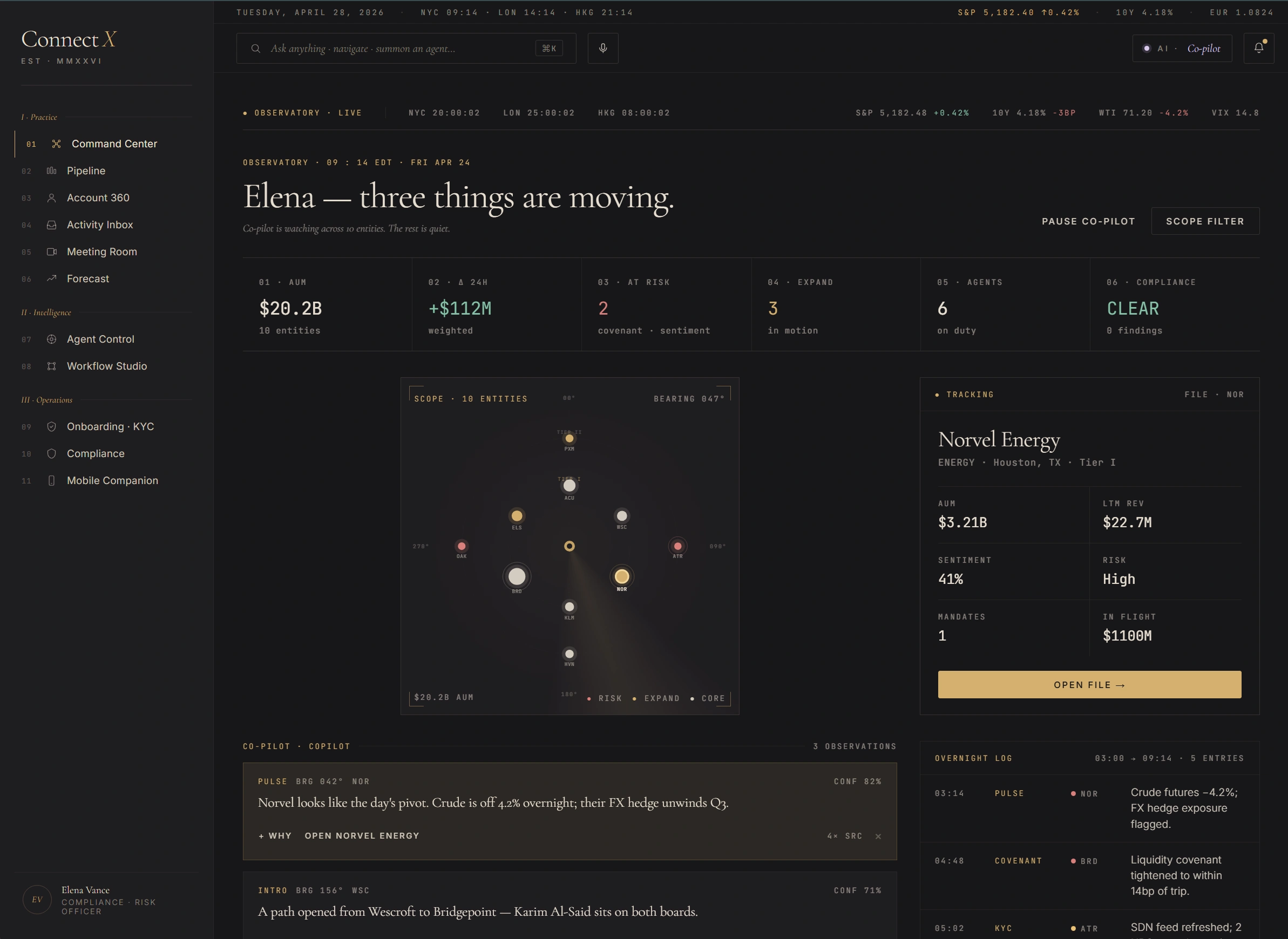
Screen 01 — Command Center. Markets ribbon · observatory radar · KPI strip · Co-pilot observations stream.
Observatory radar, not list
Ten entities placed by AUM × risk on a polar plot. Tier I clients on the inner ring, Tier II on the outer. Hot ones (status: risk) glow red; expansion ones gold. The RM sees the book at a glance — not as 200 rows.
Three things, not 47
The hero number is "Three things are moving." Co-pilot suggests; RM picks. The "rest can wait" framing is editorial restraint applied to alerts — opposite of the typical CRM dashboard where everything competes for attention.
One open file at a time
Right pane shows the actively-tracked relationship (Norvel Energy here). Click another node on the radar; this pane swaps. Encourages depth-first reading rather than tab-fan-out.
10 mandates moving through the pipeline.
Not a Kanban. A flow chart. Five stages render as horizontal bands; mandates appear as vessels with two attributes — pressure (age, red→amber→green) and velocity (AI signal, rising / stalled / new). The Co-pilot tracks both; it does not move cards for the RM. Bridgepoint Synthetic Prime shows up at $2.4B in Closing — the band visibly carries more weight than the others.
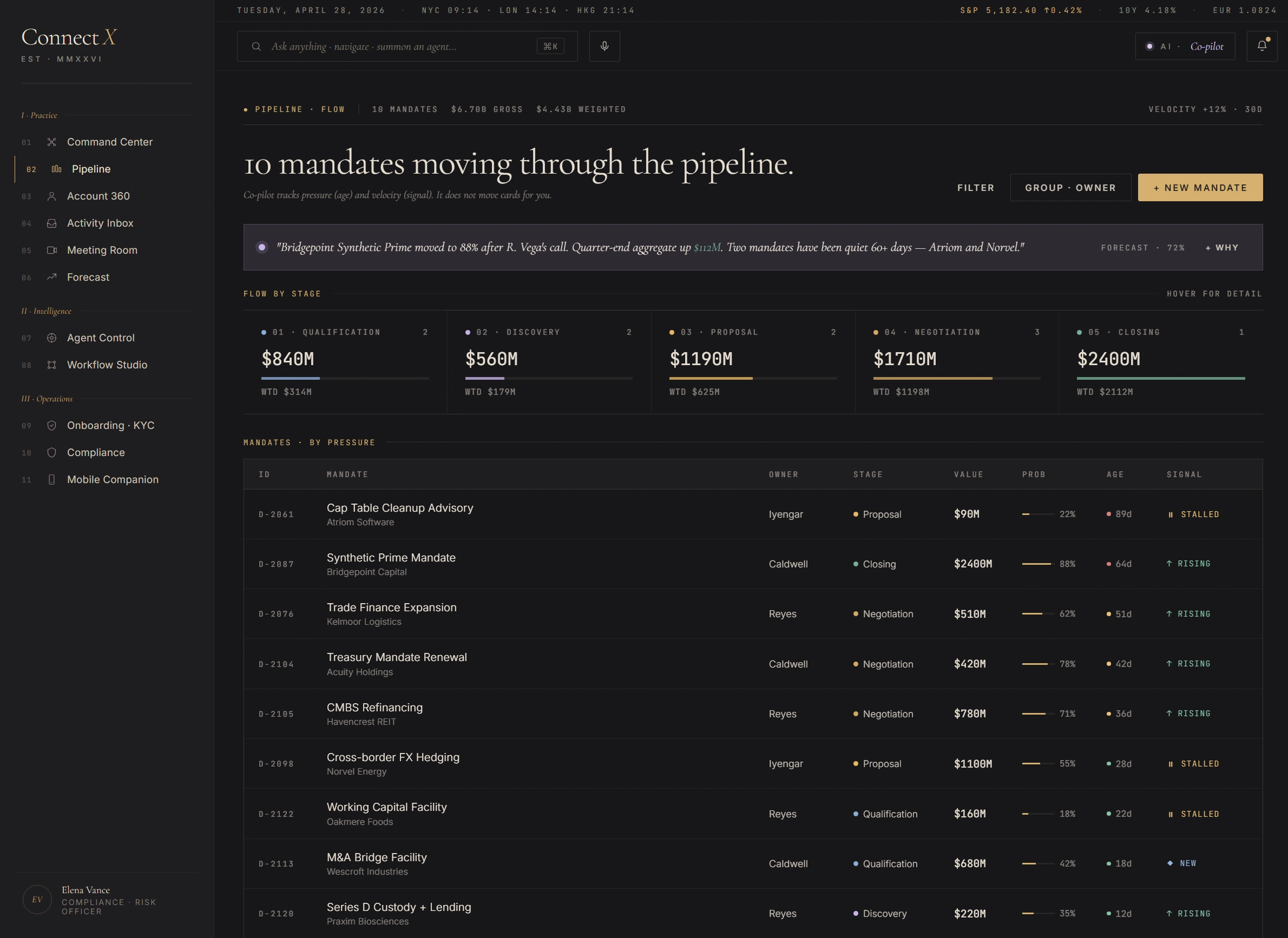
Screen 02 — Pipeline · Flow. Five-band flow chart · weighted gross per stage · sortable-by-pressure mandate table.
Asymmetry is honest
One $2.4B mandate dwarfs nine others. A Kanban hides this; a flow chart shows it. Wealth pipelines aren't lead-funnel uniform — the band widths are intentional.
Pressure colour-coded
Age tinted red→amber→green per row. The Cap-Table Cleanup at 89 days (Atriom) reads as a stalled deal without the RM having to mentally compute "how old is too old".
AI signal, not AI command
Last column shows the FORECAST agent's read: rising / stalled / new. Suggestion only. The RM still moves the deal; the agent never auto-progresses a stage.
Acuity Holdings — relationship graph as the page.
Most CRMs hide the relationship graph behind a "Relationships" tab. ConnectX inverts: the graph is the page; the data tabs become drill-downs. Fourteen entities, seventeen edges, two live agent signals. Each node is sized by AUM and tinted by warmth (hot / warm / cool / cold). Click any to drill; the canvas remains.
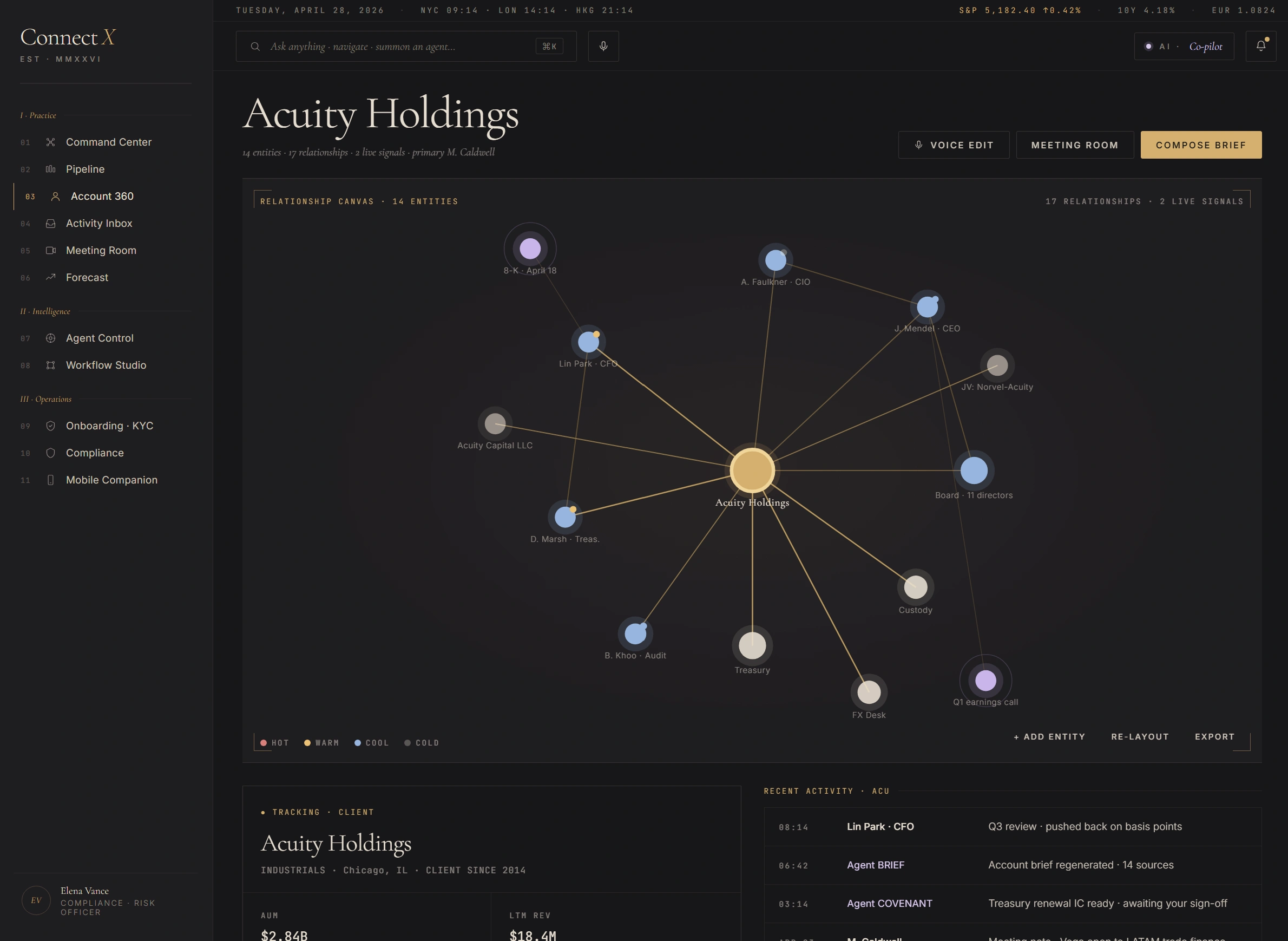
Screen 03 — Account 360. Fourteen entities · seventeen relationships · two live agent signals · warmth-coded nodes.
Graph IS the page
Not a sidebar widget — the orbital canvas takes the full primary surface. Reduces the cost of moving between people, deals, and signals. They're all just nodes you can click.
Warmth temperature, not status
Hot / warm / cool / cold replaces the binary "active / inactive" of standard CRMs. Captures the soft state of a relationship — Lin Park is "warm" because he pushed back on the basis points last week; that's not "active" but it's not "stale" either.
Live agent signals on canvas
Two ongoing agent observations are pinned to the relevant nodes. AGENT COVENANT on Treasury, AGENT BRIEF on the IC review thread. Visible without leaving the canvas.
"Everything moving today."
A signal stream, not an email list. Eight entries today across four categories — Agents, Humans, Priority, All — chronological with priority-coded left rule. AI items wear oxidized lavender; human items wear ivory. The right pane previews the selected entry; the action affordances stay consistent — Open Account / Reply / Defer.
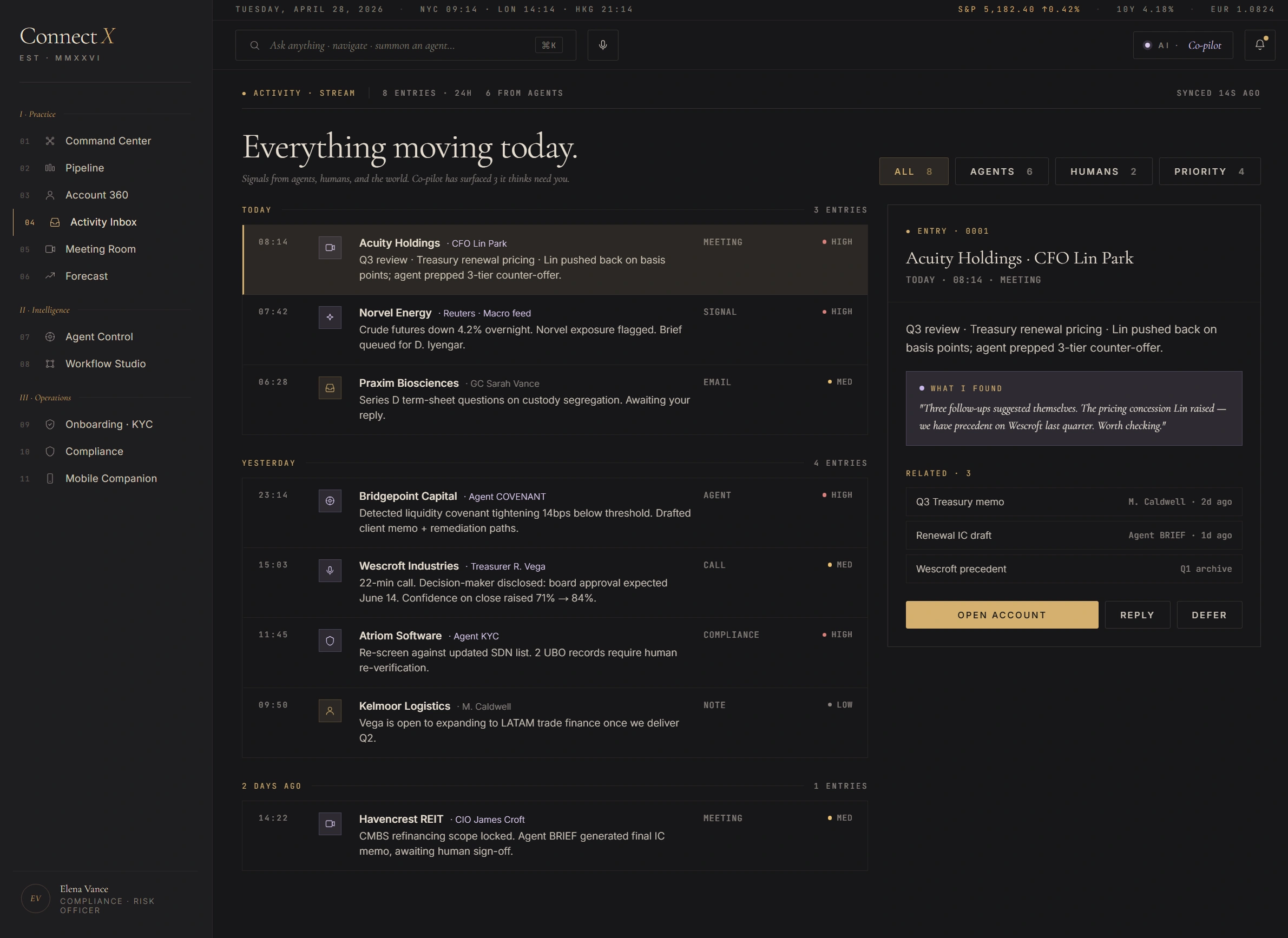
Screen 04 — Activity Inbox. Signal stream · priority-coded left rule · agent/human glyph distinction.
Stream, not inbox
Signals — meetings, agent fires, market drops, calls, notes — are equal first-class items. The default CRM activity feed makes "added a contact" the same weight as "covenant breach"; this surface ranks by priority + recency, not by source.
Lavender for AI
Items where an agent fired (PULSE on Norvel, COVENANT on Bridgepoint, KYC on Atriom) are tinted oxidized lavender. Human-authored items stay ivory. The RM can read provenance at a glance without reading the source field.
Right-pane defer affordance
Three actions, always: Open Account, Reply, Defer. "Defer" is the meaningful choice — it pushes the item to a tomorrow queue with a reminder. Slack's "Remind me" pattern, ported to a CRM context.
Lin Park · CFO Acuity Holdings — live, 06:08 elapsed.
A live call surface with three columns. Left: the live transcript. Centre: sentiment trajectory (54% — pulse paused at 14:09 when Lin softened slightly when Wescroft was differentiated). Right: "Want this in your hearing?" stack — three reference materials Co-pilot is preparing. Bottom strip: Co-pilot wants your attention — a draft of a pricing concession the RM can show, dismiss, or resume. Workflow paused while awaiting the human.
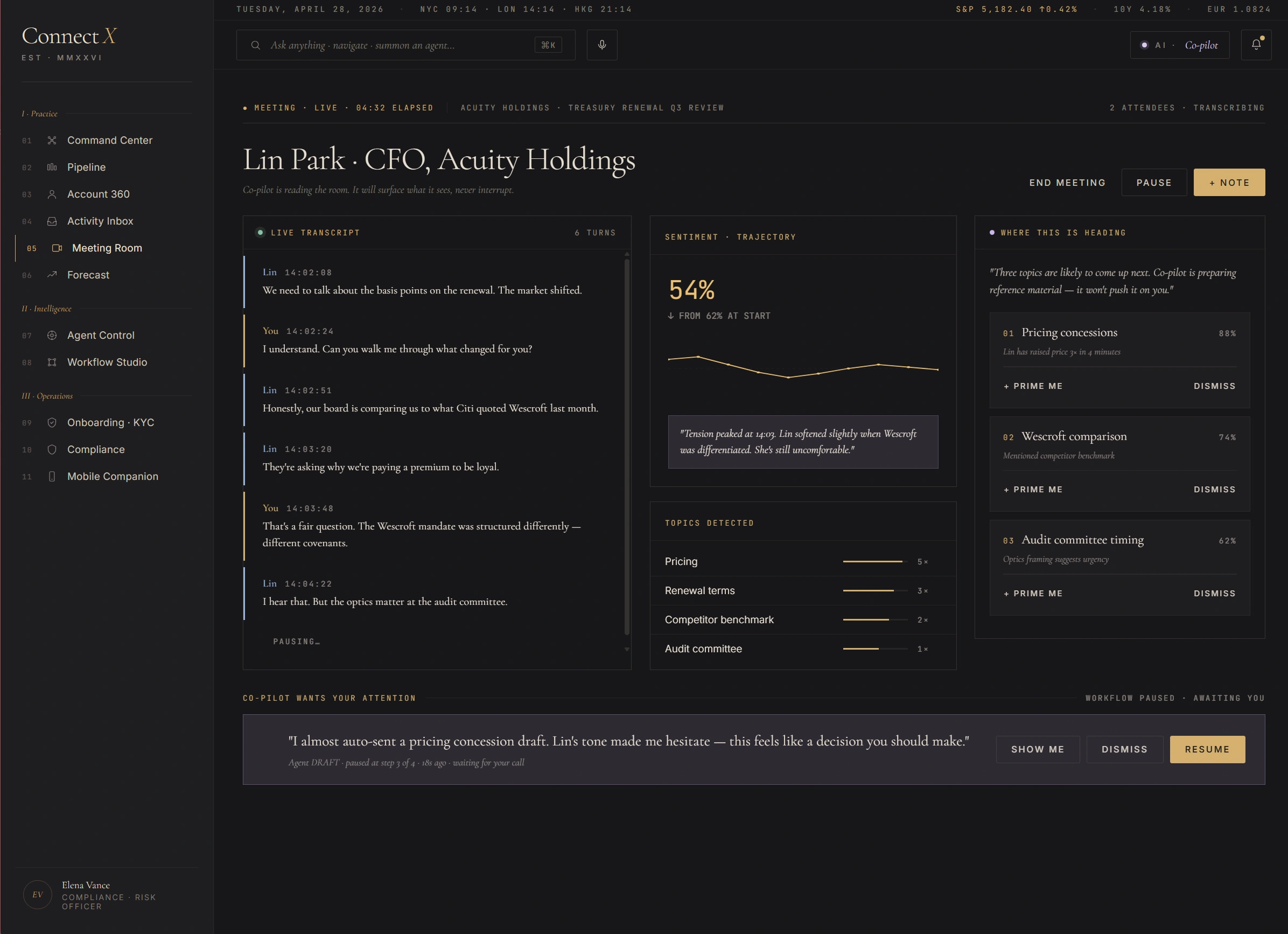
Screen 05 — Meeting Room. Live transcript · sentiment trajectory · Co-pilot prep stack · workflow-paused affordance.
Sentiment trajectory, not score
The sentiment is plotted over the call duration with the inflection points annotated. "Up from start" framing makes the call into a tracked story rather than a single number. RM can see when something shifted, not just where it landed.
"In your hearing" stack
Right column is what Co-pilot has prepared in case the RM needs it. Three items queued, each with a Prime Me / Dismiss action. Reference is staged but not pushed onto the screen mid-call.
Workflow paused — awaiting you
The bottom strip shows a draft Co-pilot wrote (pricing concession). It is staged but not sent. The RM gets explicit Show me / Dismiss / Resume controls. AI prepares; human signs.
Where the portfolio is going.
Agent FORECAST runs 4,000 scenarios nightly. Confidence intervals shown — ask why for any line. AUM trajectory plotted across eight quarters with a grey "today" anchor and a probability cone extending forward. Below, two surfaces: "What moves the number" with positive and negative drivers ranked, and "Ask agent · what-if" — a free-text scenario field that returns a re-run.
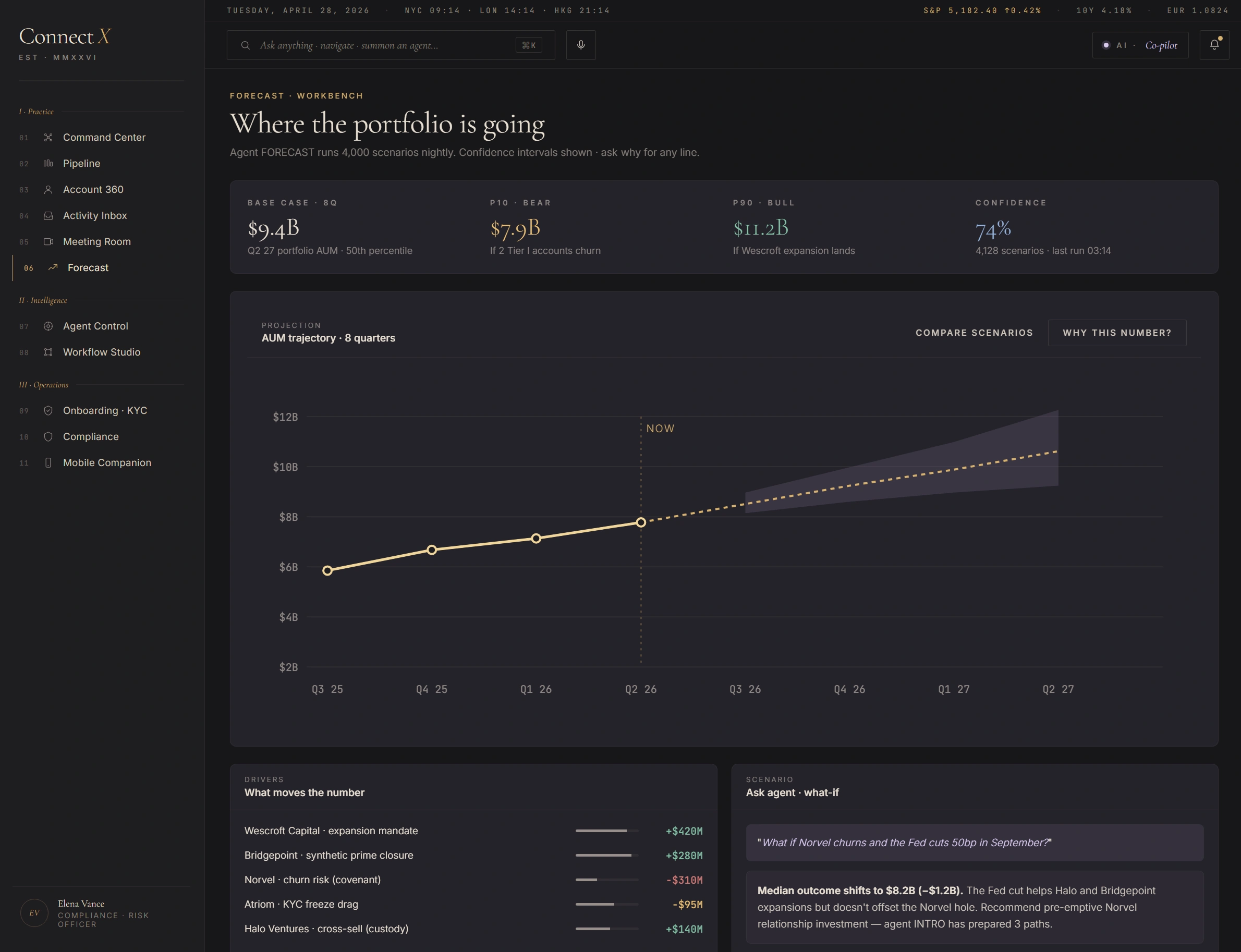
Screen 06 — Forecast Workbench. Cone-not-point estimates · driver attribution · what-if scenario field.
Cone, not point
The grey shaded area is the P10–P90 confidence band. Point-estimate forecasts ("$10.4B by Q4") hide the model's uncertainty. The cone forces the reader to see both expected value and width — and the agent's confidence (74%) is shown alongside.
Drivers ranked, not aggregated
Why is the number what it is? Five drivers shown with explicit dollar contribution. Two positive (Wescroft expansion, Bridgepoint closure), two negative (Norvel + Atriom KYC freeze drag). RM gets the shape of the number, not just the number.
"Ask agent" what-if surface
Free-text scenario input ("What if Norvel churns AND the Fed cuts 50bp in September?"). Agent FORECAST re-runs against the modified assumption and returns the new cone. Median outcome shifts visible inline.
Eight agents on duty.
Watch what each agent is doing, set guardrails, intervene when needed. Every action is signed and audit-ready. Eight cards, one per agent. Each card shows status (active / review / training), actions today, precision-30d (calibration), last fired, and the most recent action sample. The KYC card has two items pending Compliance approval — Review / Approve actions are exposed inline.
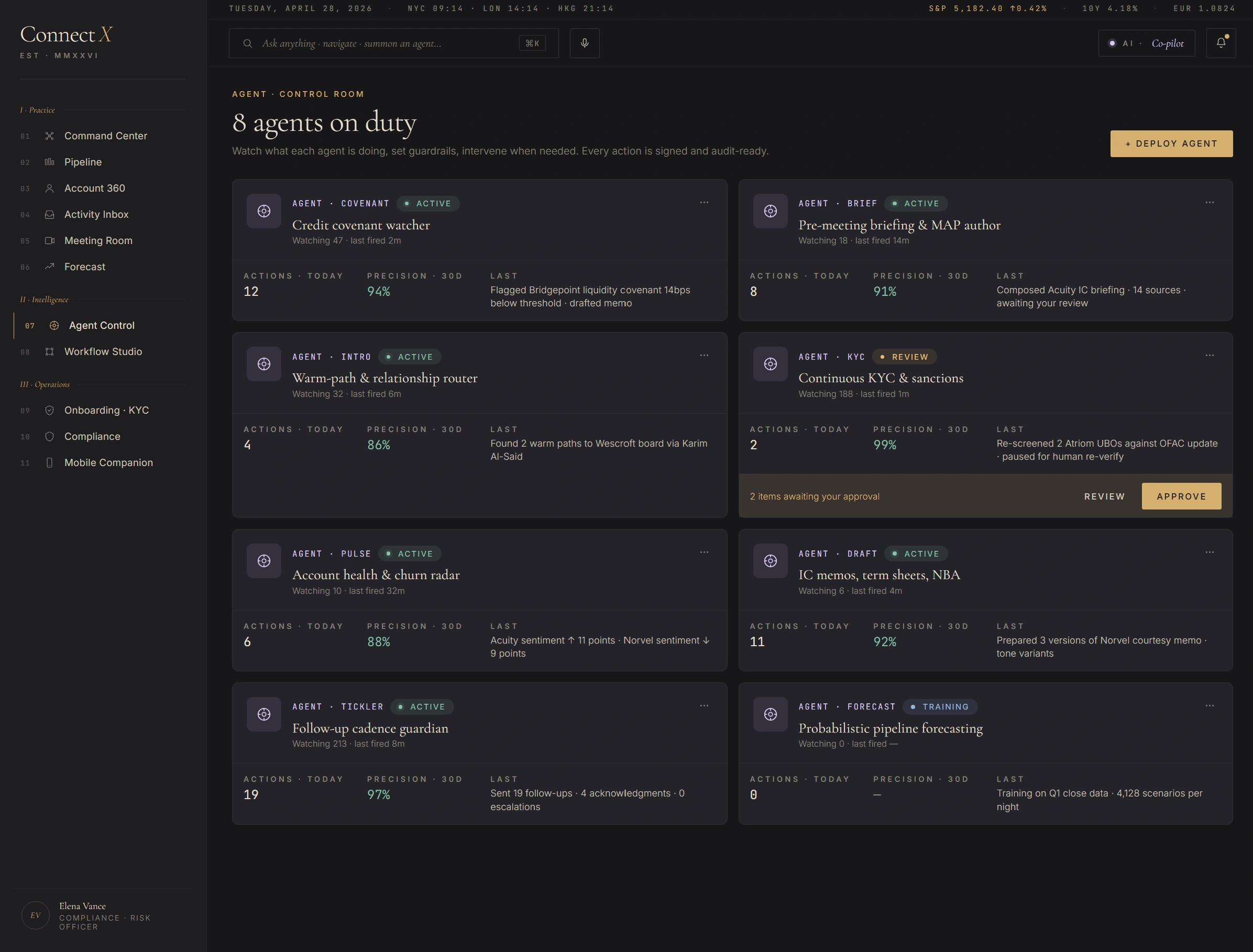
Screen 07 — Agent Control. Eight named agents · status / actions / precision / last fired · inline approve affordance for pending items.
Named, not generic
"AI assistant" is unauditable. COVENANT, BRIEF, INTRO, KYC, PULSE, DRAFT, TICKLER, FORECAST — each has a single role, a beat, and a verb. Compliance reviews each agent's policy without scanning prompts.
Precision-30d as calibration
Each agent shows a rolling 30-day precision (true positives / total fires). FORECAST is in "training" status — Compliance has held it back from production until calibration crosses policy threshold. Visible governance.
Approve inline, not in a queue
KYC has two re-screen items pending after an OFAC update. Review / Approve buttons live on the agent's card itself — no separate "approval queue" page. The decision happens where the context is.
"How an account is born."
A visual builder for the onboarding flow. Compliance gates are non-negotiable; agent steps are bounded by policy. Last run: 14m, zero manual interventions. Three views — Build (canvas), Runs (history + duration distribution), Policy (gate register). Each view is the same workflow seen through a different stakeholder's eye.
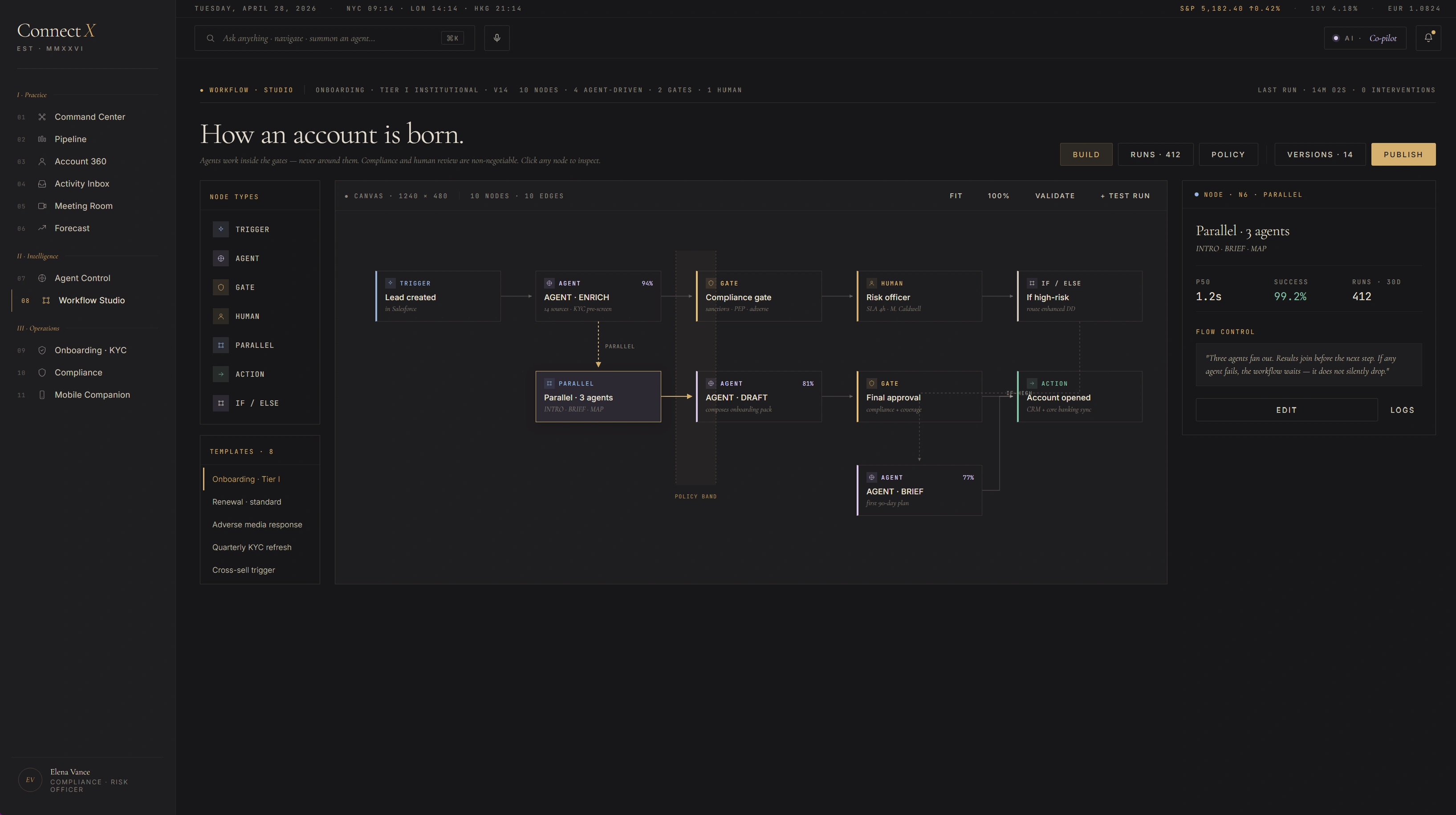
Build view — canvas with grid · 10 nodes · routed edges · selected-node inspector · flow control footer.
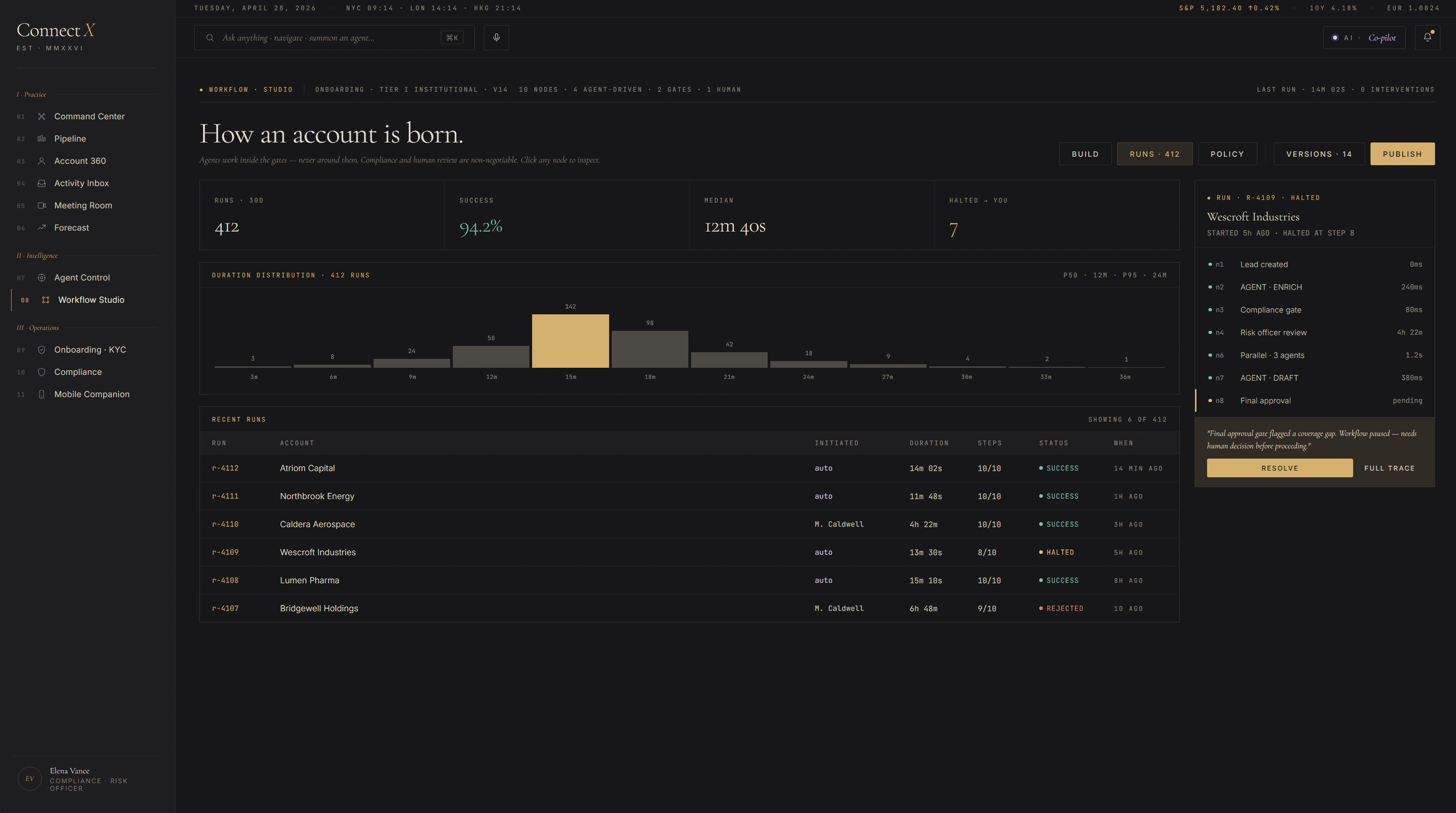
Runs view — duration distribution · 30-day success rate · halted-run trace with reason.
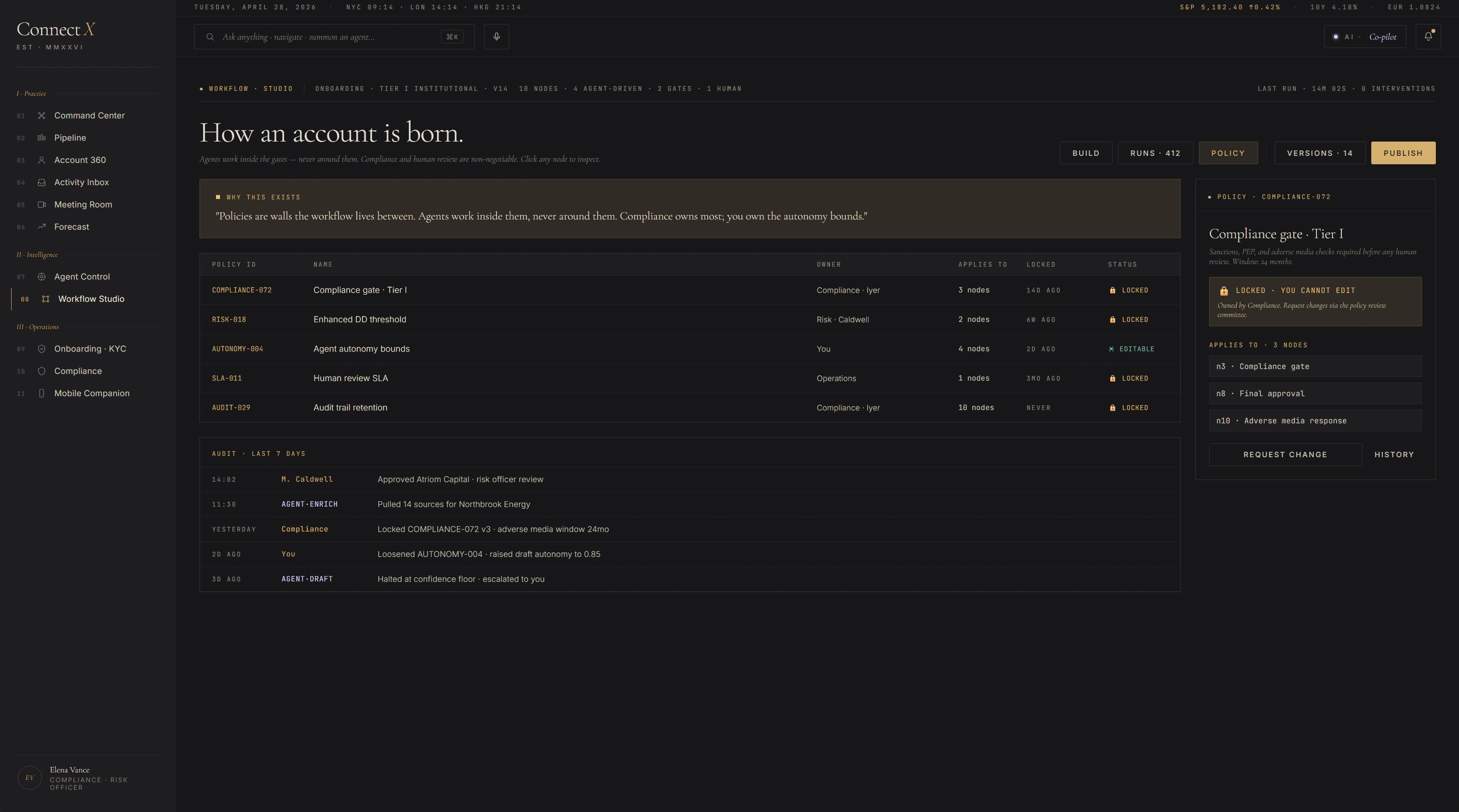
Policy view — gate register · who owns what · request-change vs history audit trail.
Agents work inside gates
The vertical band on the canvas marks the policy zone — Compliance gates are non-negotiable walls; agent steps are bounded by them. Visible architecture, not hidden config.
Three views, one workflow
Build is for the architect. Runs is for the operator. Policy is for Compliance. Same data, three reads. No "compliance dashboard" sold separately — it's the same source.
Halted-run trace is a feature
When the flow stops mid-run (Wescroft's Northbridge Energy halted at Risk Officer review), the run history surfaces why, not just that. The decision is logged at the stopping node, not buried in a JSON.
Atriom Capital · Tier I — continuous KYC, not one-time form.
Last refresh 6h ago. Two UBOs flagged for re-verification after SDN list update. Five-step status strip across the top: Identity verified · Beneficial ownership 2 needs you · Source of wealth complete · Sanctions screen complete · Final risk decision pending. Below, the UBO list — 14 verified, 2 flagged. The flagged ones get a clear Re-Verify call to action; the verified ones stay quiet.
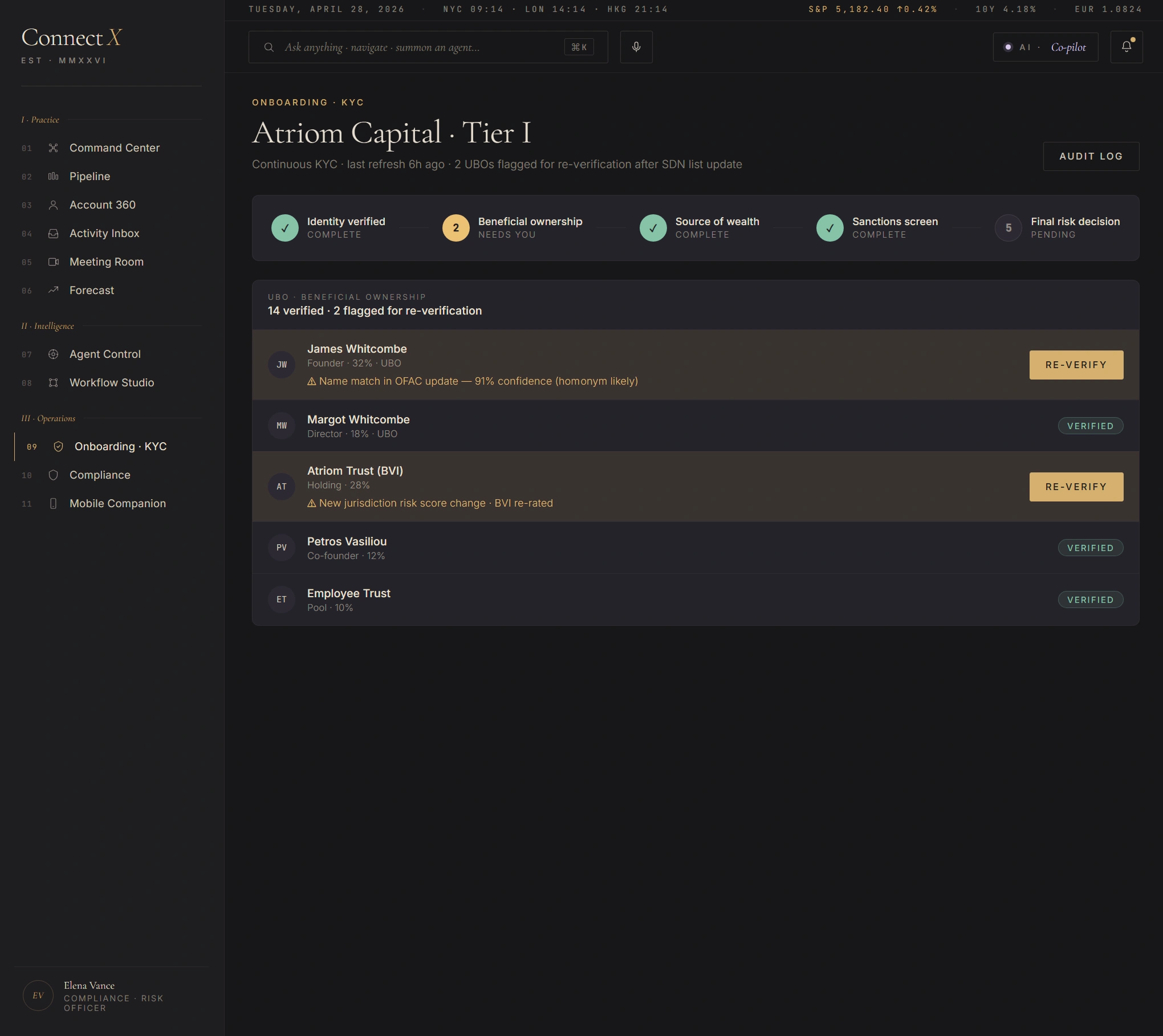
Screen 09 — Onboarding · KYC. Five-step status · 14 UBOs verified · 2 flagged for re-verification · per-row audit affordance.
KYC isn't a one-time form
SDN list updates trigger automated re-screen. The flagged UBOs are a continuous-KYC artifact, not an onboarding artifact. The UI surface acknowledges that with "needs you" language.
Confidence on the flag, not just the flag
"91% confidence (homonym likely)" — agent KYC's read on its own match. Lets the Compliance officer see uncertainty inline. Reduces false-positive review fatigue without hiding the flag itself.
Audit log is one click
Top-right Audit Log button exports the full record (KYC events, sanctions screens, UBO changes, document refreshes) for this entity. SOC-2 / SR-11-7 / FATF expectation: every screen has a path back to the file.
"The portfolio · seen through risk."
Compliance Officer's separate surface — not the RM's view dimmed. Six top-line counters at the top (0 open findings, 188 KYC current, 6 KYC expiring 30d, 2 sanctions hits, 14,302 audit signatures, 2,847 AI actions reviewed). Centre: a 5×5 portfolio risk matrix (likelihood × impact) with cell counts and severity tinting. Right: an "every action, signed" running log — agent actions chronologically with timestamps and approver names.
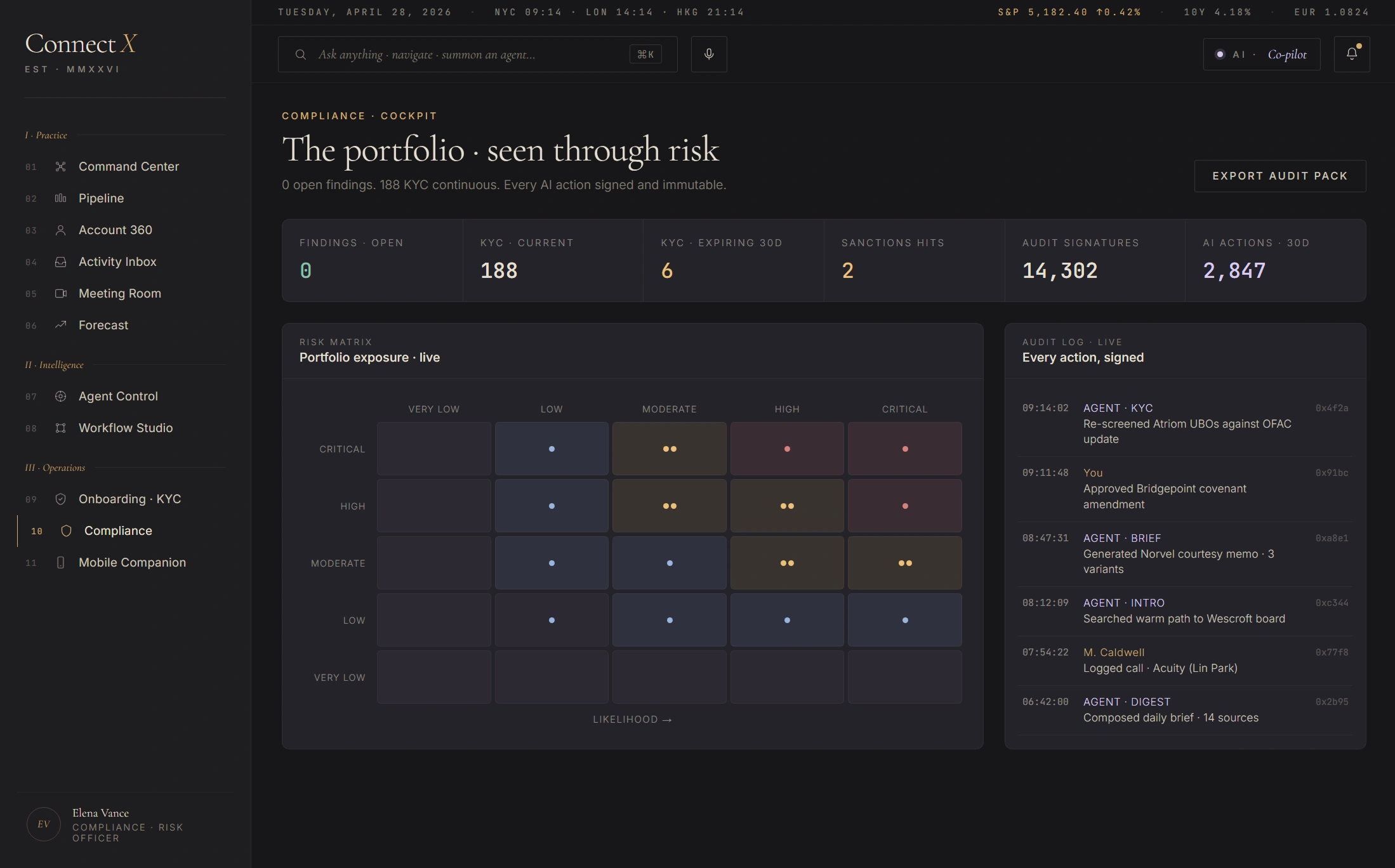
Screen 10 — Compliance Cockpit. Six top-line counters · 5×5 risk matrix · running audit log · one-click export-audit-pack.
Separate surface, same source
Compliance does not get a "filtered RM view" — they get their own first-class screen. Mixing the two audiences dilutes both. But the data backend is shared; export pulls from the same audit ledger the RM's actions write to.
5×5 likelihood × impact matrix
Standard risk-management chart, rendered honestly. Each cell shows count + severity tint. Critical-high cell glows red; low-low cell stays muted. The CRO can read the book in two seconds.
"Every action, signed"
The right pane scrolls every agent action chronologically — agent name, action verb, target, approver. Cross-references back to the originating screen. Export Audit Pack button packages the whole trail.
The observatory, shrunk.
Phone-shaped surface for the road. Today's three names, the agent brief, the next two meetings, the voice command palette. Mobile is not "the same screens but smaller" — it's a different read of the same data, optimised for a five-minute taxi between meetings. Image forthcoming — currently in build.
Mobile screen visual — coming next pass.
"Speak as you would to a colleague."
Voice is the AI surface that works at every autonomy tier. The RM presses Cmd+. anywhere in ConnectX and dictates a sentence. The agent parses it into structured actions, shows the interpretation back as a typed diff, and waits for approval. Update Acuity Holdings — change risk tier to medium-high and flag covenant 11 for review by Friday. Two actions. Confidence 96%. Audit signed in 3.4 seconds.
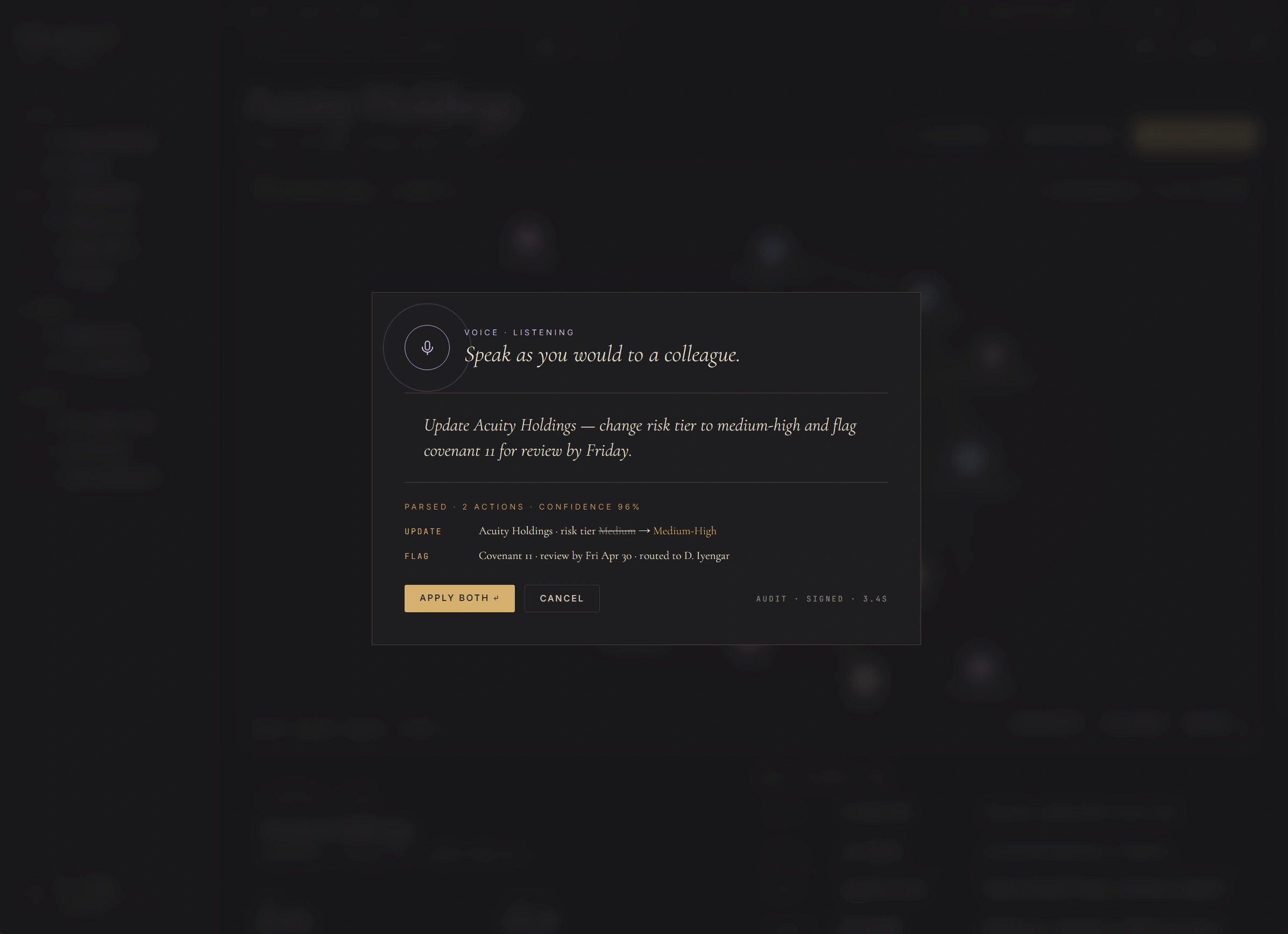
Voice command modal · live parsed-action preview · single-click apply with audit signature in 3.4s.
Diff before commit
Voice doesn't fire actions blind. The parsed interpretation appears as a typed action diff ("Medium → Medium-High") with confidence band. RM reads, then decides Apply Both or Cancel. Same model as Intent Canvas — typed artifact between human and AI.
Cmd+. anywhere
Voice is summoned from any screen — Command Center, Account 360, Meeting Room. Doesn't require navigating to "Voice Mode". The modal floats above the current context; the RM returns to the same place after dismissal.
Audit signed in 3.4s
The footer countdown shows the agent's confidence interval and a signed hash for the action. Even voice-issued commands write to the same audit ledger as keyboard-issued ones. No back door for the AI surface — every action accountable.
Editorial register over enterprise tropes.
The visual brief was Hermès campaign films and FT Weekend titles, not enterprise-dashboard chrome. Cormorant Garamond carries display, italics carry voice, JetBrains Mono carries data. Gold leaf is the only saturated colour and is used like jewellery — single accent, never wallpaper. AI moments wear oxidized lavender, distinct from gold so users can read agent presence at a glance.
What ConnectX is not.
Concept-quality work earns trust by stating its boundaries. ConnectX is a research artifact, not a shipped product. Reviewers should read it accordingly.
- Not shipped to a real bank. No production user has ever touched ConnectX. The data is synthetic, the persona is fictional, the agent fires are deterministic mocks.
- Not an enterprise-CRM competitor pitch. ConnectX is a true-concept design exploration, not a product strategy. The "CRM-as-observatory" framing is a UX position, not a go-to-market claim.
- Not a real LLM integration. Agent outputs are scripted. There is no RAG, no prompt chain, no actual model call. The interesting work is in the surface, not the inference.
- Not compliance-reviewed. A real deployment would require Legal, Compliance, Risk, and Security sign-off on every agent's policy bounds. The authority levels framework is a starting position for that conversation, not a substitute for it.
- Not opinionated about which bank. The visual register fits Geneva (Pictet / Lombard Odier), London (Coutts / Rothschild), or Asia (Bank of Singapore / Julius Baer Asia) equally. It is intentionally not a UBS-clone or a JPM-clone.
- Not a Senior PD interview prop. ConnectX exists because the design problem is interesting — private banking CRMs are genuinely worse than they should be. If a bank wants to talk about building one, separate conversation.
ConnectX evidences AI-agent governance thinking applied to a private-banking CRM: 8 named agents, 4 explicit autonomy tiers as governance primitives rather than a smartness ladder, built as a working React bundle. It is a concept artifact — the data is synthetic, “Elena Vance” is a fictional persona, and there is no connection to real CRM, KYC, or core banking systems. The disclosure register this inherits from is documented once, in full, on Finlogix, ACY Securities, and ACY Connect.
How ConnectX connects to the rest of the work.
Every case study sits on multiple threads — recurring problems, methods, or surfaces that run across the portfolio. ConnectX touches three: agent governance, editorial voice, and the regulatory routing of UI defaults.